.svg)


Cálculos de Utilización: Convierte el Tiempo en Ingresos
Se está trabajando, pero los resultados no avanzan. Identifica dónde el esfuerzo no está teniendo impacto, corrígelo a tiempo y entrega más sin aumentar la plantilla.



Cuando la entrega se ralentiza,
Cuando el rendimiento disminuye, el instinto es añadir personal. Pero las métricas superficiales no muestran si tu equipo está realmente al límite o simplemente desalineado. El resultado son mayores costes, la misma producción y ninguna solución clara.

Decide if you need more headcount - or better allocation
Calculate workforce utilization to see if your team is truly at capacity or if time is being spent in the wrong places. Fix the gap first and get more output without adding headcount.

Compare planned vs actual work
Identify gaps and reallocate work before they impact output

Break down productive vs total time
Reduce low-value work and focus on what drives results

See how teams are using their time
Rebalance workloads to keep delivery on track

Understand how work is distributed
Correct imbalances before they turn into bottlenecks

Find where time is lost
Recover that time and avoid wasted spend

Casos de uso


La entrega se ralentiza, todos parecen estar al máximo, así que contrata. Pero la producción no cambia y el tiempo sigue desperdiciándose. Encuentre dónde el trabajo no está generando resultados y soluciónelo antes de añadir personal que aumente los costes sin mejorar la producción.


Un equipo está sobrecargado mientras otro tiene capacidad, pero el desequilibrio no es obvio al principio. El trabajo se acumula de forma desigual hasta que los plazos se incumplen. Detecte el desequilibrio a tiempo y reasigne el trabajo antes de que los cuellos de botella ralenticen la entrega y retrasen los plazos.


Los objetivos no se cumplen, pero la causa no está clara. Contratación, procesos, carga de trabajo, todo parece estar bien en la superficie. Vea dónde el tiempo no se está traduciendo en resultados y corrija el problema real antes de que se manifieste en objetivos no alcanzados o en el margen.
Insightful se integra a la perfección con su ecosistema tecnológico
Con más de 50 integraciones disponibles en la plataforma Insightful, conectar con las principales herramientas de su equipo está a solo un clic.


Con la confianza de más de 5.000 equipos en todo el mundo








Tome la decisión correcta sobre el personal
Preguntas frecuentes
Los equipos pueden parecer ocupados mientras los resultados no cumplen las expectativas. La tasa de utilización de los empleados muestra cuánto tiempo está realmente impulsando la producción frente al trabajo esperado. Insightful le muestra si la capacidad se utiliza por completo o si necesita ser reasignada.
No siempre. Cuando la entrega se ralentiza, la contratación suele ser la primera respuesta, pero la capacidad ya puede existir. Cuando calcula la utilización de la fuerza laboral con Insightful, puede ver si los equipos están realmente al máximo o si el trabajo necesita ser redistribuido.
Porque el tiempo invertido no siempre se traduce en resultados. Comparar las horas de trabajo activas frente a las programadas con Insightful muestra si las brechas son reales o causadas por cómo se distribuye el trabajo, para que pueda solucionar el problema en lugar de añadir más trabajo o personal.
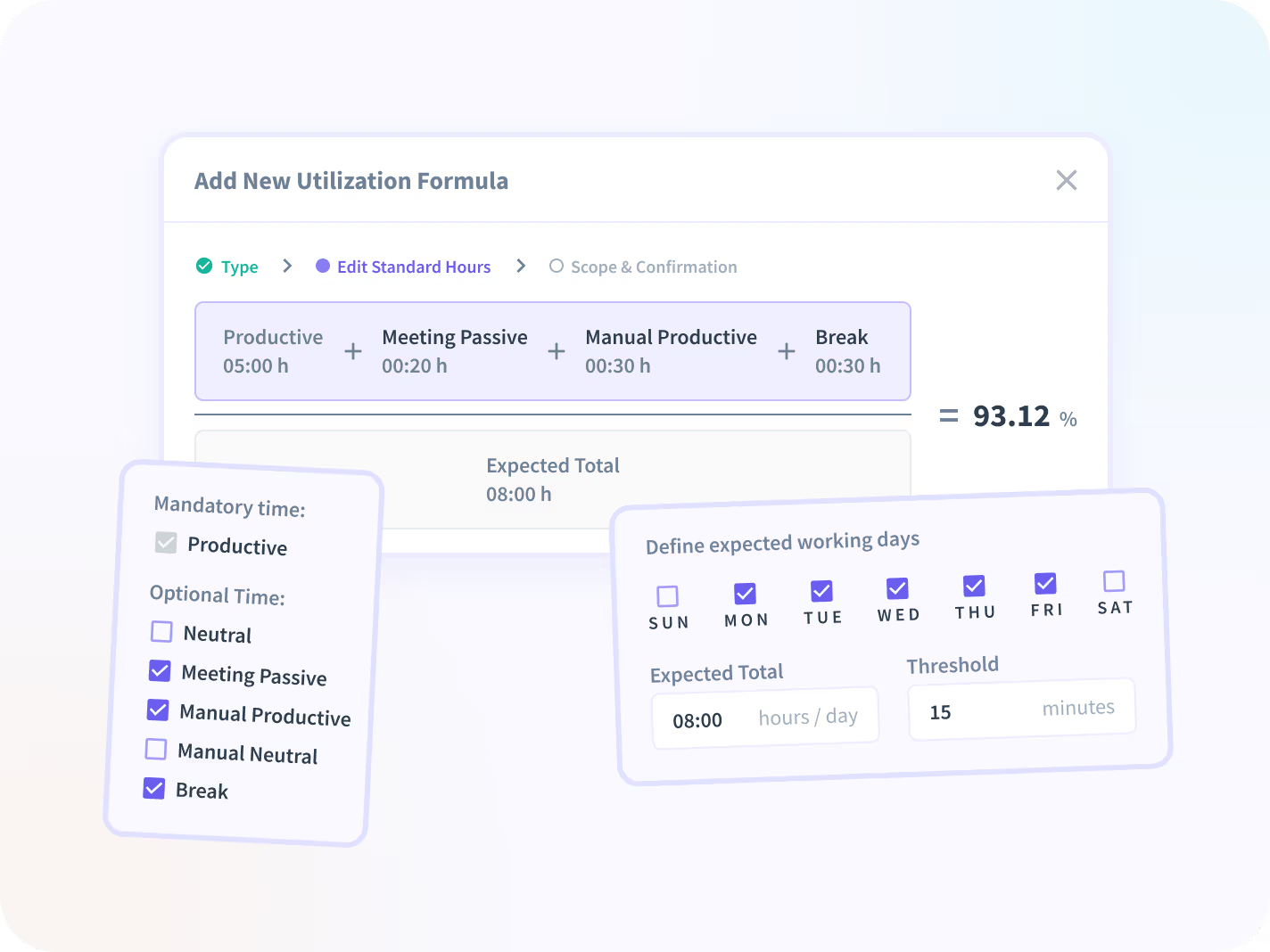
Sí. Diferentes equipos operan de manera diferente, por lo que puede usar Insightful para definir cómo calcular la tasa de utilización de los empleados según los horarios y los tipos de trabajo. De esta manera, los números reflejan cómo cada equipo contribuye a la producción y respalda mejores decisiones de personal.
Los datos de utilización muestran cómo el tiempo se convierte en resultados en todos los equipos. La puntuación de utilización de empleados de Insightful se agrega para resaltar patrones en las horas de trabajo productivas, ayudándole a decidir dónde reasignar el trabajo, dónde la capacidad está subutilizada y si realmente se necesita personal adicional.


