.svg)


Precision Time Tracking Software for Growing Teams
Automatically log billable vs. non-billable hours. See in-depth activity data in real time, and allocate your team’s day more efficiently. No manual self reports required.

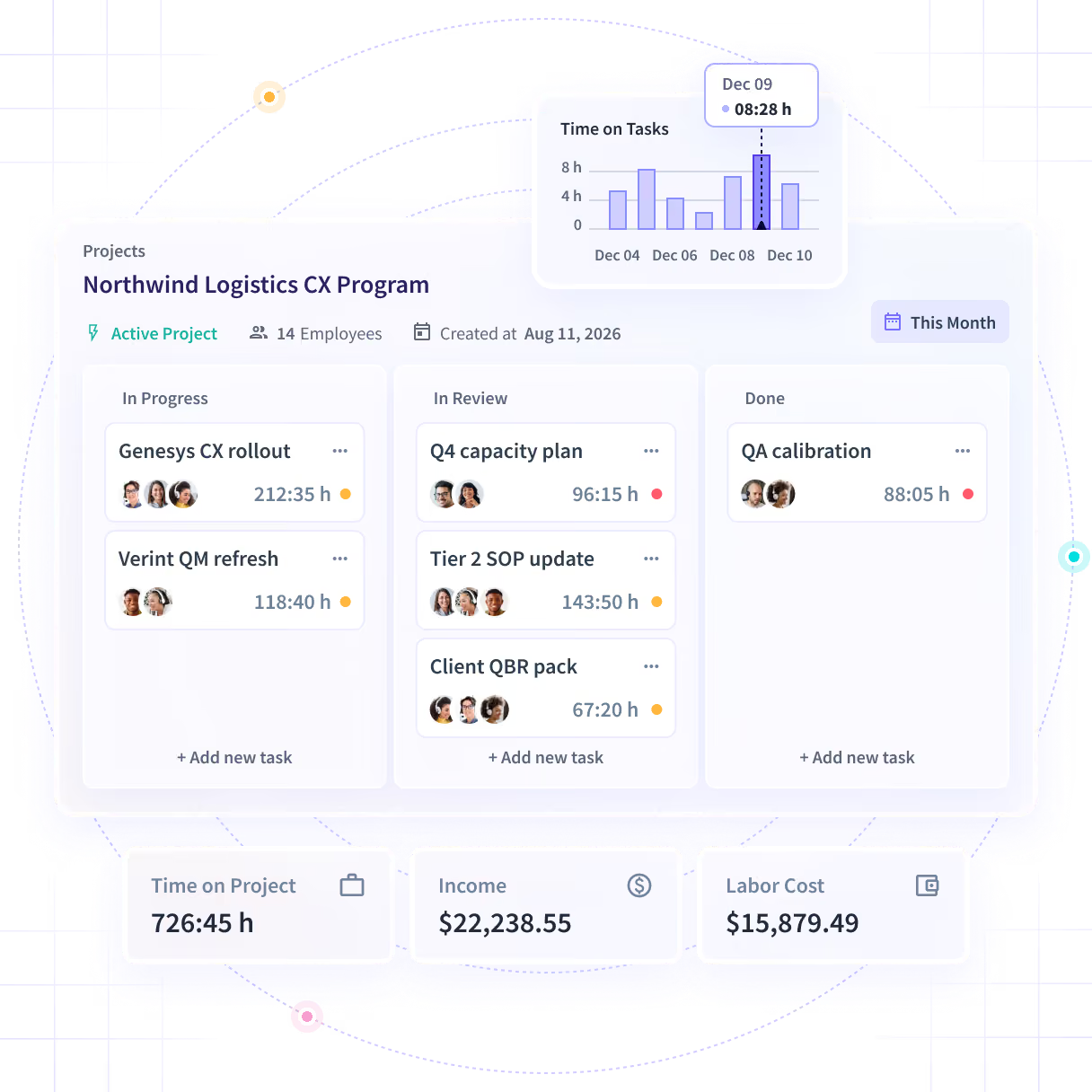
Employee Time Tracking Software that Goes Deeper


Time tracking + workforce analytics
in one platform
Most time trackers log hours. Insightful goes deeper: productivity trends, capacity planning, and app/website usage in the same view.
Enterprise-grade security by default
SOC 2, ISO 27001, HIPAA, GDPR, and CSA compliance built in.
Precision work data connected to actual outcomes
Reduce non-billable time. Optimize workflows. Recover capacity and get real ROI.


See Where the Workday Went, Without Asking Anyone
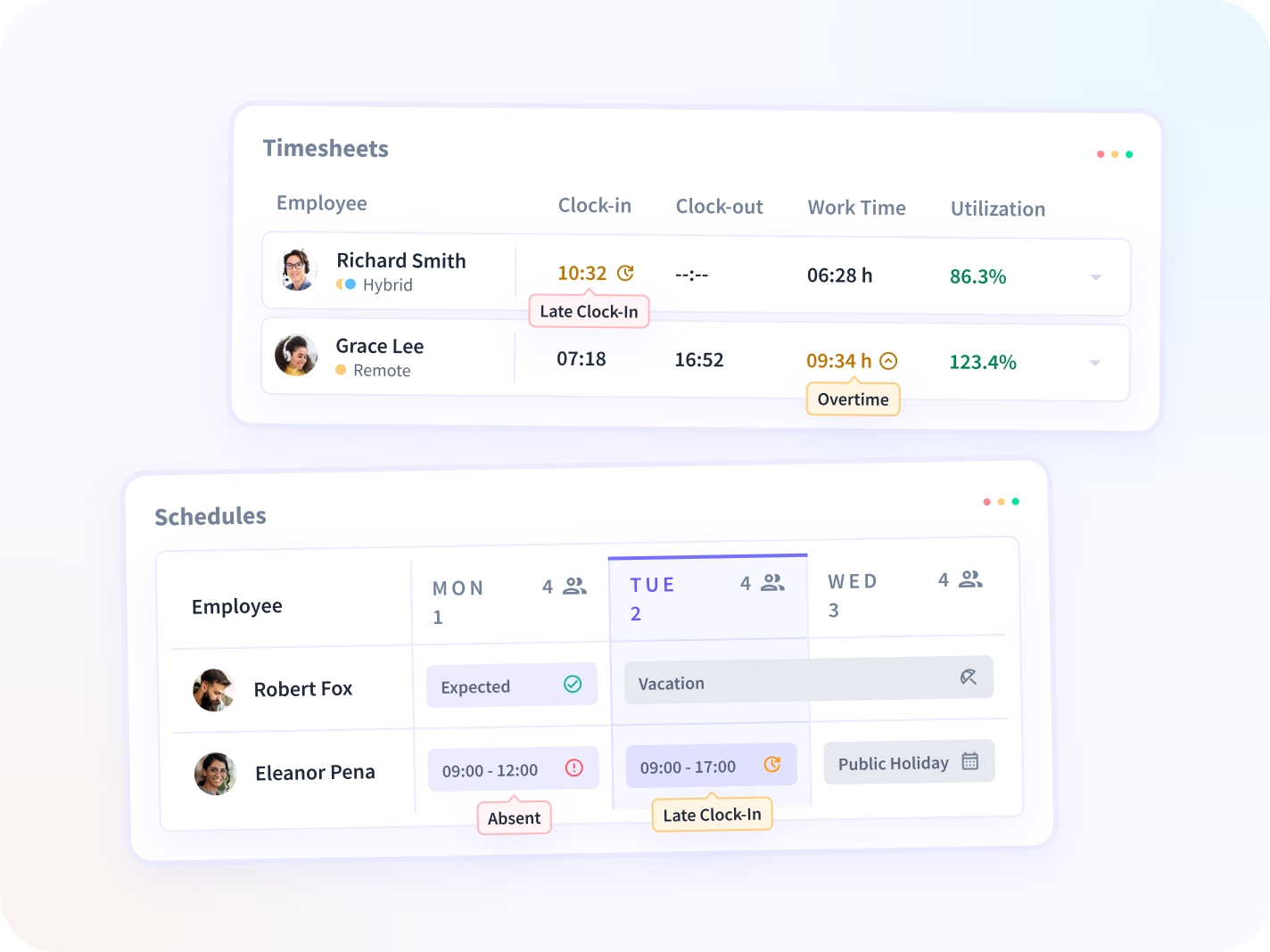
Clock-in, clock-out and work time capture themselves. Active, idle, meeting and manual time land on one timeline, and the timesheet is accurate enough to bill from. See it in action above.
Automatically spot lost time before it hits your bottom line

Automatic time tracking
Runs silently to capture granular work data in deep context.

Time tracking with privacy
Customizable settings, role-based views, configurable access control.

Flexible real-time reporting
Track by project, task, role, work-type, location, department, billable hours.
How Insightful time tracking works
Automatic time capture means you get real-time work data without the heavy setup. But the depth of the data lets you go even further.


Don’t leave time tracking up to your team’s best guess at the end of the week. Capture it in real time, with no room for errors.
Insightful’s automatic time tracking still permits manual time entries and timesheets for teams needing flexibility.
Reallocate work, reduce non-billable time, cut wasted effort, and recover capacity. That’s the difference with built-in Workforce Analytics.
See time-on-task and time-on-project. Spot bottlenecks and improve your processes with advanced Workflow Optimization.


.avif)
Try Insightful for Free Today
Accurate Time Data From Your Most-Used Tools
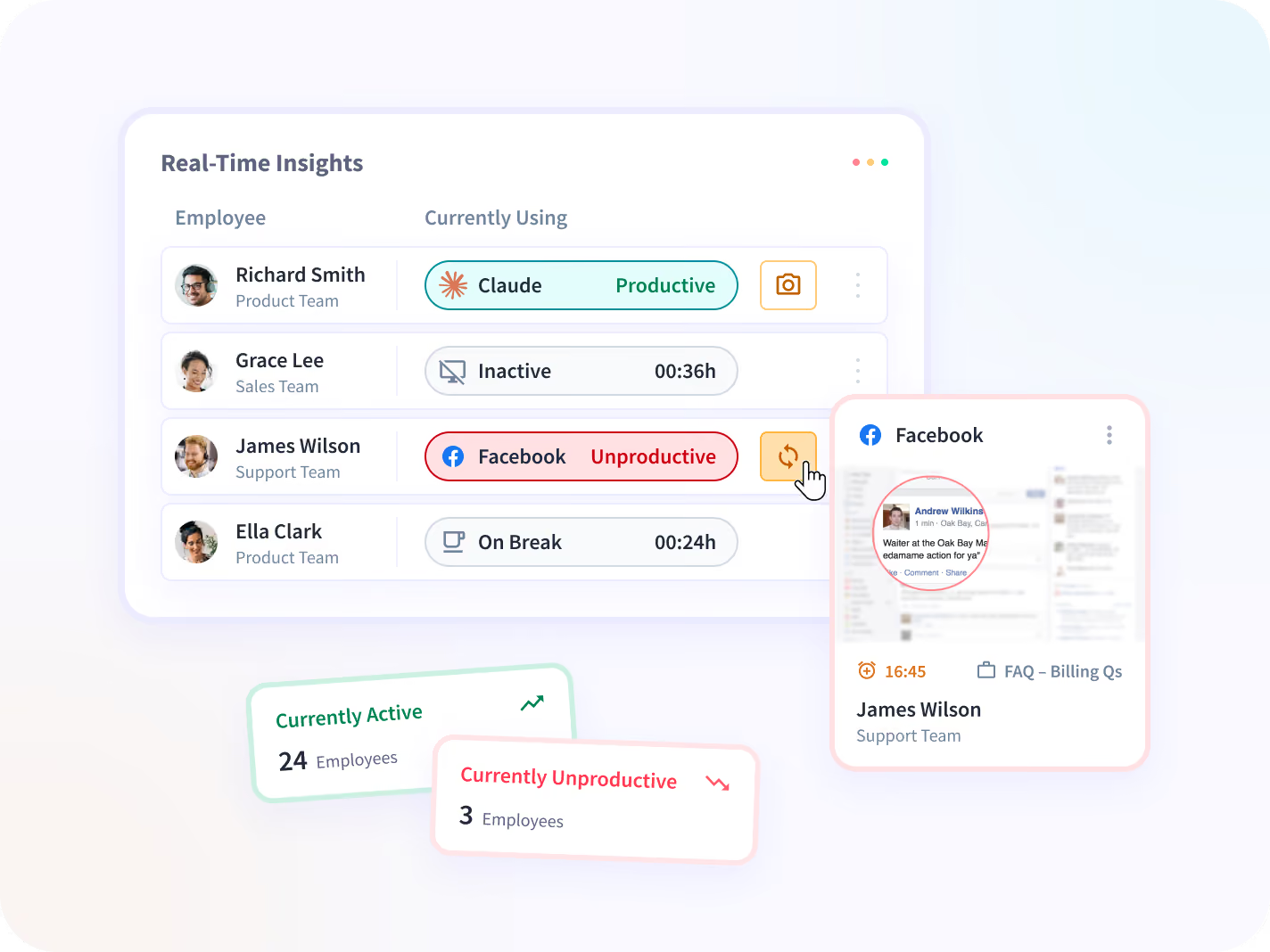
Insightful works alongside your existing tech stack to surface actionable decision points. Reduce short-term productivity loss, increase capacity, and prevent missed targets.
Monthly or quarterly reviews catch issues too late. Detect work imbalances and respond faster, before performance suffers.
Plan coverage and adjust workloads with PTO synced automatically from your HRIS, so disruptions from absences are already accounted for.
A salesperson’s day looks different than an engineer’s. Customize what counts as productive time by team and role.



Not Sure Where to Start With Time Tracking?
Our Ultimate Guide walks you through everything you need, from choosing the right tool to rolling it out without resistance.
Get the Ultimate Guide to Time Tracking
- Find Where Hours Disappear Uncover the hidden drains costing your team time every week.
- Roll Out Without Resistance A 7-step plan to get buy-in and avoid stalled adoption.
- Prove the ROI Upfront Quantify billing recovery, payroll savings, and productivity gains.
- Pick the Right Tool, Faster Cut through the noise and know exactly what to look for.

Time tracking: just one part of what Workforce Analytics can do
Time tracking is just the beginning. It comes built into Insightful’s powerful Workforce Analytics plan. Here’s what that makes possible for your team.

Productivity trends
Accurately distinguish active vs. idle time and detect changes in focus to avoid output decline.
.svg)
Timesheets and approvals
Generate accurate timesheets automatically to review, approve, and export.

Capacity planning
Spot overloaded or underutilized teams to rebalance workloads.

Project and cost center reporting
Budget time by task, project, and department and tie output directly to EBITDA.

Employee Monitoring
Remove bottlenecks, redirect effort to core work, and standardize best practices for faster execution.

Website and app usage tracking
Track utilization and productivity by work type, style, and role to optimize tool usage.
Comprehensive Data Security
Encrypted data and multi-certificate compliance keep your work data private and secure. HIPAA, SOC 2, ISO 27001. GDPR, CSA and more.





.svg)
GDPR compliant to protect against damaging
data breaches.
.svg)
.svg)
Connect All Your Tools to Insightful with Seamless Integrations
Frictionless API pipeline access gives you actionable datasets that feed directly into your infrastructure. Add any tool without rebuilding, with full HRIS sync and authentication scoping.


Award-Winning Software.
Loved by Customers.
Insightful employees' monitoring software earns top ratings for helping teams work smarter—with clarity, simplicity, and real results.









Time tracking that stays accurate even at massive scale
Mercor turned to Insightful to ensure accurate, automatic billing while hyperscaling its contractor network to 30,000+. That precision time capture now saves them up to $9 million per week.



Artemas Radik
The Head of Platform at Mercor
Time Tracking Guide: ROI, Methods, and Implementation
What is time tracking?
Time tracking is the practice of recording how working hours are spent across tasks, projects, and clients. In modern teams, it goes beyond clocking in and out. It captures which tasks consume the most effort, where bottlenecks form, and how time estimates compare to actuals, giving operations, IT, and HR leaders a reliable record of how work is actually done.
In distributed teams, that record becomes even more important. Without the passive visibility of a shared office, managers need structured data to plan capacity, allocate work fairly, and catch problems before they affect delivery. Time tracking provides that foundation.
How do you know if your business needs time tracking?
If two or more of the signals below apply to your team, missing or manual time data is likely costing you more than you can currently see. Five signs your business needs time tracking:
- Timesheets are still managed in spreadsheets or collected manually
- Deadlines keep slipping with no clear cause visible to leadership
- Clients question invoices or ask where their budget was spent
- There is no real-time or historical data to identify bottlenecks or capacity gaps
- Workload is unevenly distributed, and no one can see it clearly
Where does the workday actually go?
A significant share of every workday is consumed by activity that is never tracked, never billed, and never reviewed. The purpose of time tracking is not to watch employees more closely. It is to make invisible work visible so teams and leaders can address what is slowing them down.
- Email and messaging: Knowledge workers spend about 28% of their workweek on email, per McKinsey Global Institute.
- Meetings: A 2024 Atlassian survey found 77% of knowledge workers are often stuck in meetings that end only in scheduling another one. Microsoft WorkLab's 2025 report adds that 57% of meetings are ad hoc.
- Unrecorded microtasks: Small, unlogged tasks at 15 minutes a day add up to over 60 hours a year of untracked work (illustrative estimate).
- File searches and admin: An APQC survey found knowledge workers get only 30 productive hours out of a 40-hour week, the rest lost to internal communication, information searches, and unnecessary meetings.
- Tool sprawl: A Talker Research survey for Slack found small business owners lose 96 minutes a day to distractions and app-switching, and Gartner puts the average worker at 11 apps per day.
- Inefficient processes: Time, attendance, and expense errors occur 1,139 times a year per 1,000 employees, per an EY analysis for Paycom.
- Hybrid and remote visibility gap: Owl Labs found 21% of managers cite reduced visibility into their remote team’s work as a top concern, compared to 15% for in-office teams, a symptom of distance removing the cues that make performance visible.
Time tracking makes losses measurable, and measurable losses can be reduced.
What are the different time tracking methods?
Time tracking methods range from manual paper logs to automated software that captures activity without any employee input. The right choice depends on team size, work type, and whether you need task-level data or just attendance.
What should you look for in time tracking software?
The right time tracking software does more than log hours. It connects time data to projects, teams, and business outcomes. When evaluating options, focus on six capabilities that actually change how decisions get made:
- Automatic time capture rather than manual timers, which reduces friction and improves data accuracy
- Real-time visibility across office, remote, and hybrid workers in a single view
- Billable vs. non-billable separation, critical for professional services, agencies, and BPO teams
- Payroll and HRIS integrations to eliminate manual reconciliation between systems
- Compliance and privacy controls, including role-based access and configurable anonymization
- Project and budget reporting that shows time against budget by task, project, and department, so overruns are visible before they affect delivery
How do you calculate the ROI of time tracking?
The return on time tracking comes from four measurable levers. Run the calculation on your own workforce numbers to get a figure that reflects your actual cost structure.
- Billing accuracy: Calculate the gap between hours worked and hours invoiced across your last quarter. Then compare that gap to the annual cost of the software.
- Payroll error reduction: Manual timesheet errors add up quickly. Automated capture replaces end-of-week recall with recorded hours, and with Insightful's Time Tracking & Auditing, every manual entry needs a named approver and is logged in an audit trail.
- Productivity recovery: Using the APQC benchmark of 10 lost hours per 40-hour week, estimate what recovering even 20% of that time would mean for your team's output. H&CO, for example, reclaimed over 200,000 hours a year with automatic time tracking.
- Project overrun prevention: Track your last five projects and calculate average overrun as a percentage of budget. With time logged against each project’s budget as work happens, an overrun shows up mid-project rather than at invoice time.
More productive hours = higher returns
FAQs
Yes. Insightful supports major security and privacy frameworks including SOC 2, ISO 27001, HIPAA, GDPR, CSA, and CCPA. Customer data is encrypted in transit via SSL/TLS 1.2 and at rest with AES-256, with keys managed through Google Cloud KMS.
For self-hosted / on-premise deployments, technical implementation itself only takes 1-2 days depending on infrastructure discovery, requirements, and agent rollout. Customers are typically fully operational within two weeks.
Insightful offers 50+ integrations across project management, help desk, employee directory, and BI tools including Jira, Trello, Asana, Azure DevOps, GitHub, GitLab, Linear, Wrike, and Basecamp, and BigQuery.
Insightful keeps customer data while the account remains active. Screenshots and screen recordings are stored for up to 2 months, activity logs for up to 3 months, and other data for up to 24 months. Some information may be retained longer where needed for legal obligations, disputes, fraud prevention, or enforcement purposes.
Employee time tracking software records how employees spend work hours, automatically or manually, across tasks, projects, and applications. It replaces manual timesheets with accurate, real-time data that supports payroll, billing, and productivity analysis.
Insightful fits both ends of that range. Small teams get automatic tracking and simple reporting out of the box, while enterprise teams get capacity planning, compliance certifications, and API access for deeper integration.
Insightful tracks both. It distinguishes active from idle time automatically, so reports reflect actual working time, not just clocked-in hours. For how idle time is detected and how to adjust the threshold, see our What is Idle Time guide.
Yes. Insightful generates timesheets automatically from tracked activity, which can be reviewed, approved, and exported for client billing or payroll.
Insightful runs as a lightweight desktop agent for Windows, macOS, and Linux. See our system and network requirements and Linux installation guide (Beta) for OS-specific setup details.
No. Time tracking records how long tasks and projects take, giving teams and leaders a picture of where work time goes. Employee monitoring is a broader category that can include real-time apps and website usage, productivity reporting, screenshots, or advanced analytics like a communication report that breaks down meeting time vs. deep focus time. Time tracking is one component a monitoring platform may include, but the two are not interchangeable.
Timesheets are a method of recording time, typically completed manually at the end of a day or week. Time tracking is the broader practice, which can be done through timesheets, but also through automated software that captures activity in real time without employee input. Manual timesheets introduce delay and error; the longer the gap between doing the work and logging it, the more the record depends on memory rather than what actually happened.


