.svg)


Workforce analytics software that shows where margin leaks, by team
Hours alone don't show which team is stretched and which has slack. Insightful compares capacity, productivity, workload and risk across teams, so you can fix staffing and delivery before margin moves.











Spot where performance varies across teams, then close the gap
A timesheet and a headcount report can't show where margin leaks. Insightful breaks down work distribution, capacity and risk by team, so the gap shows while there is time to fix it.


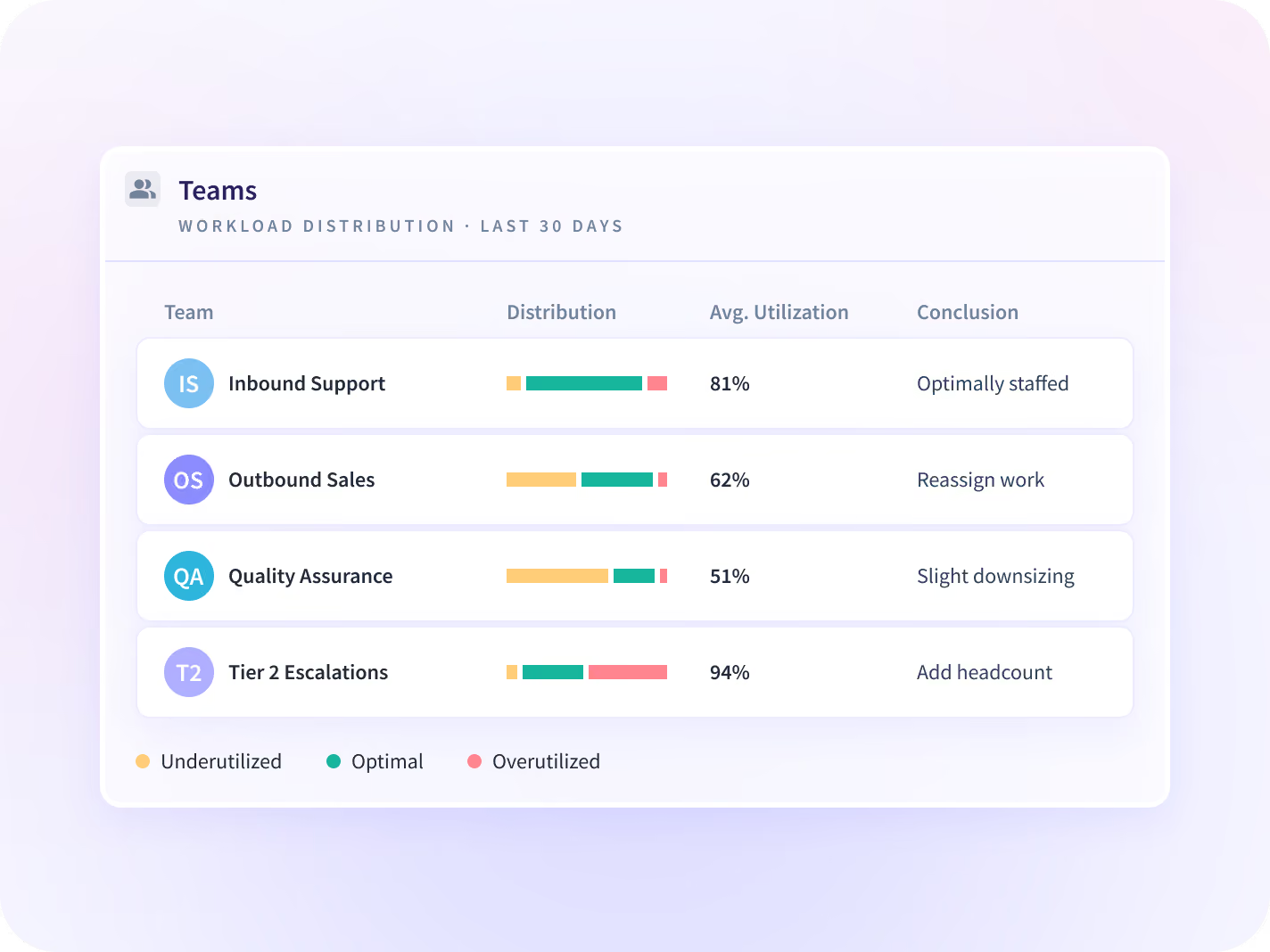
Workload Distribution sorts each team into over-, optimally and underutilized, and the Communication Report shows whether meetings are why, so you move the right work.


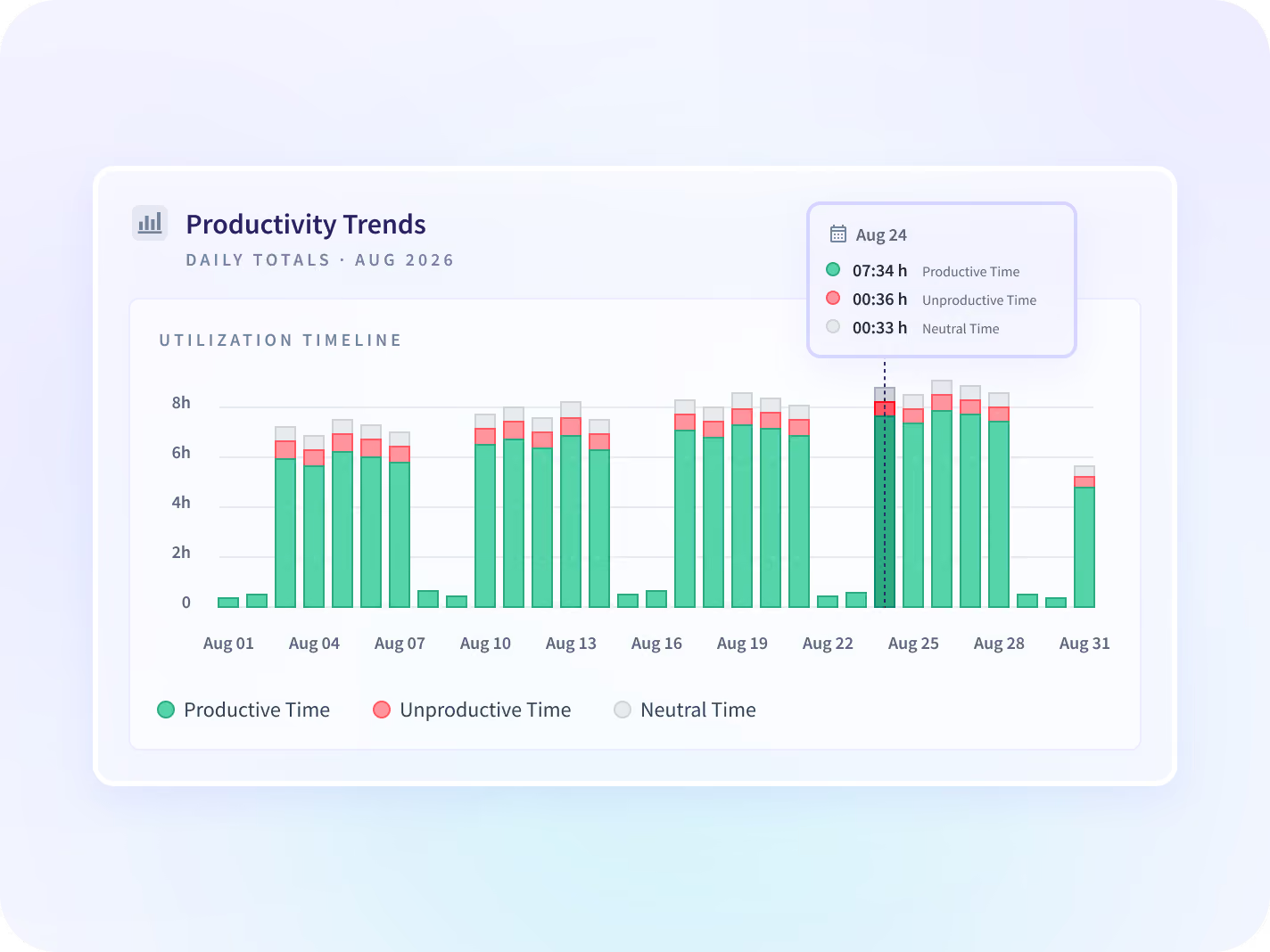
Productivity Trends shows which team is falling behind the period before, so you can move work before a commitment slips.


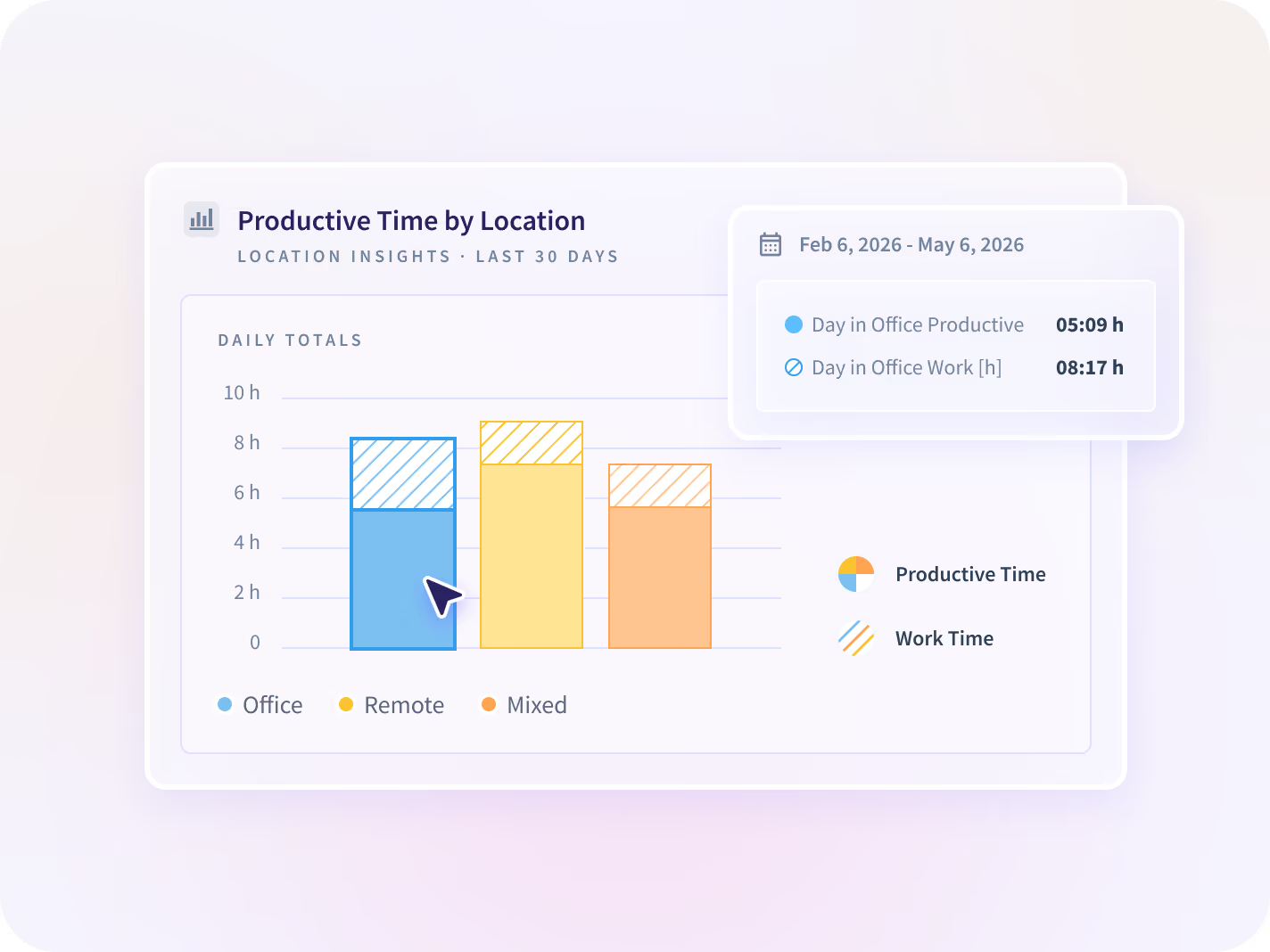
Location Insights compares productive time on office, remote and hybrid days by team, so you can see where each team does its best work.


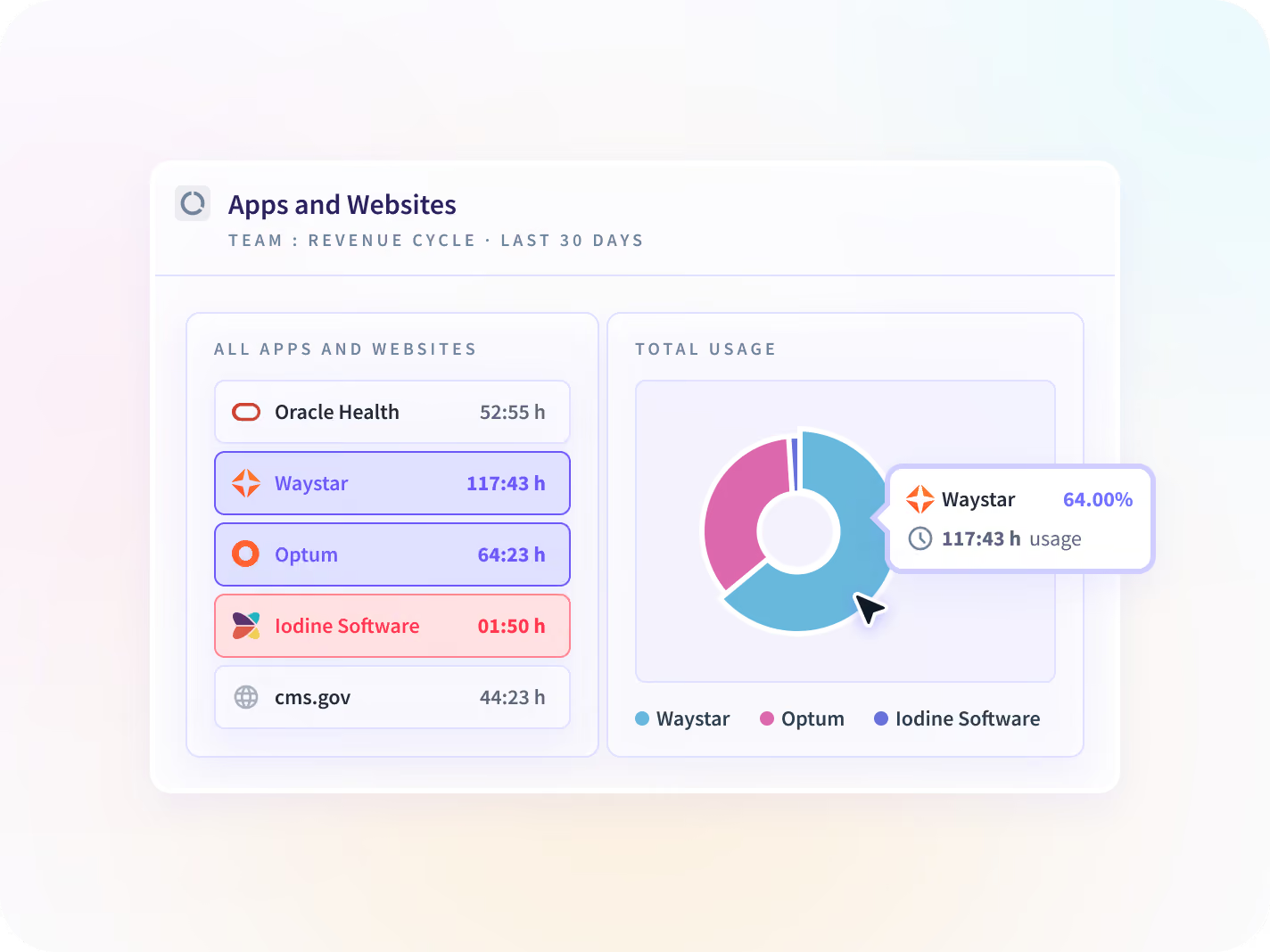
Apps & Website Usage and AI Adoption show which licenses and AI seats sit unused, so you cut them before renewal. TRG cut tool costs 56%.
Open on the numbers your role owns, with Customizable Homepage
Executives, managers and admins don't read the week the same way. Pick the widgets and KPI cards you need, drag them into place, and they are waiting each time you log in. Every view follows the permissions of the person logged in.


Customizable Homepage walkthrough.

How a week of activity becomes a staffing decision
Insightful captures the work, sets each team against its own period before and against the other teams, and shows where to act. You make the call with the record in front of you.

Activity
Hours, apps and meetings, captured as people work

Patterns
Each team against the period before

Comparison
Teams compared on rules set per team

Decisions
Staffing, delivery and spend, settled on the record
No keystrokes, no webcam, and in a visible rollout each employee sees their own record.
The record behind every staffing, billing and tooling call
Each feature reads the same record, so the hours in one report match the hours in the next. Turning one on is a settings change, not another deployment.

Workload Distribution
Sorts each team into over-, optimally and underutilized against a range you set, so work moves before someone burns out. On Enterprise plans.

Productivity Trends
Shows utilization and productive time for every team against the period before, so a stretched team shows before an SLA slips.

Real-time Insights
Shows who on each team is working, idle or not yet started, so a coverage gap gets fixed during the shift, not after it.

Productivity Labeling
Sets which apps and sites count as productive for each team, so one team's core tool never counts against another.

Communication Report
Splits each team's day into Communication Time and Focus Time, so you can see which meetings are eating the week.

Location Insights
Compares productive time across office, remote and hybrid days by team, so hybrid policy rests on output. Team level, never GPS.

Apps & Website Usage
Ranks every application by real use and flags tools nobody rolled out, so a seat gets cancelled before it renews. TRG cut tool costs 56%.

AI Adoption
Shows daily AI users, idle paid seats and each team's place on the Adoption Maturity Matrix, so enablement goes where use is lowest.

Time Tracking
Records hours as people work and sends every manual entry to a named approver, so payroll and invoices run on approved hours.

Schedule Adherence
Tracks late clock-ins, absences, overtime and undertime against each schedule, so a coverage gap shows before the shift ends.

Irregular Behavior Alerts
Flags mouse jigglers, auto-clickers and other emulated activity with a screenshot at the trigger, so faked hours never reach an invoice.

Screen Monitoring
Takes periodic screenshots with passwords, banking details and private messages blurred by default, for reviews that need visual context.
See Workforce Analytics in action
Walk through Workforce Analytics with sample data before you book a call.
One record, read by Operations, HR, Finance and Security
Each team sees the part of the week it owns, with the same numbers underneath.


Your HRIS, connected on every plan, never sold as an add-on
Workday, BambooHR, HiBob, SAP SuccessFactors and more sync every 15 minutes, so new hires land in the right team, leavers stop being tracked, and approved PTO never reads as idle time.


$2.5M back in three months, and 200,000+ hours a year










What does each team's time turn into?
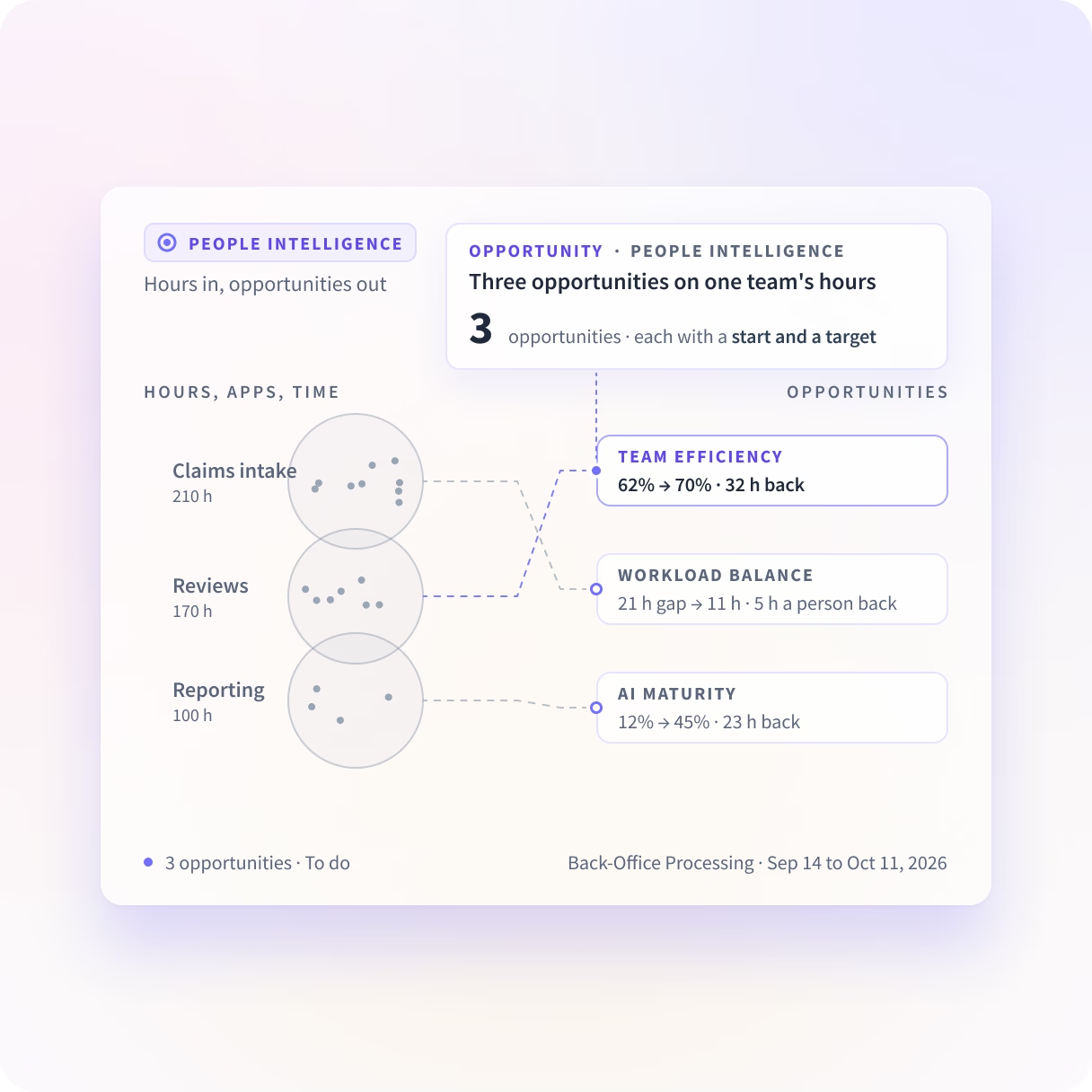
People Intelligence shows what each team's hours turn into: where AI helps, who carries what, and which team found a better way. It suggests what to change, with the number that shows it worked.

Stop running teams on numbers that hide where margin leaks
What Workforce Analytics buyers ask us most
Workforce analytics software turns data on how work happens into decisions about capacity, productivity, workload and risk. Insightful collects that data from one desktop application and reports it by team, against the period before, so you can see where performance varies. It will not tell you why a number moved, only which team and which week to ask about.
Time tracking answers how many hours were worked. Workforce analytics answers where those hours went and how teams compare: which applications, which meetings, how much focus time was left, which team is over capacity. HR analytics is a third thing that reads systems of record such as headcount, tenure and survey results. Insightful does the first two from the same desktop application.
Yes, on every plan, with no add-on fee. Workday, BambooHR, HiBob, SAP SuccessFactors and other HRIS platforms sync employee records every 15 minutes, assign people to the right teams and deactivate leavers. For nine of them, approved PTO syncs in as well, so leave never reads as idle time.
No keystrokes, ever. Insightful captures which apps and pages are in use and for how long, and the Communication Report counts messages and their timing without reading them.
Activity data is available the same day the desktop application is deployed. Seven days of use is enough for a first audit of where each team's hours go. Anything entered by hand is flagged as manual and goes to a named approver.
Anyone without a primary computer. Workforce Analytics is built for desk-based knowledge work on Windows, macOS and Linux, not a warehouse floor, a retail floor or a driving fleet. Settle that before anyone plans a rollout across every site.
Workforce Analytics is priced per seat, per month, and HRIS integrations are included. Workload Distribution is available on Enterprise plans, and the Workspace Security add-on is a paid add-on on any plan. Current pricing is on the pricing page.
Ask three questions: what does it refuse to capture, are teams compared on rules set per team, and does the HRIS integration cost extra? Your legal reviewer will ask the first one. Our comparison pages set all three out row by row.
Workforce Analytics shows the input, from the time perspective. People Intelligence shows the output, and what happens in between.
The data behind your capacity, workload and productivity numbers also shows what each team's time turned into, and what to change. We see the apps, sites and AI tools your teams use, and what they do in them.


