.svg)


Renew the AI seats that produced work, not the ones assigned
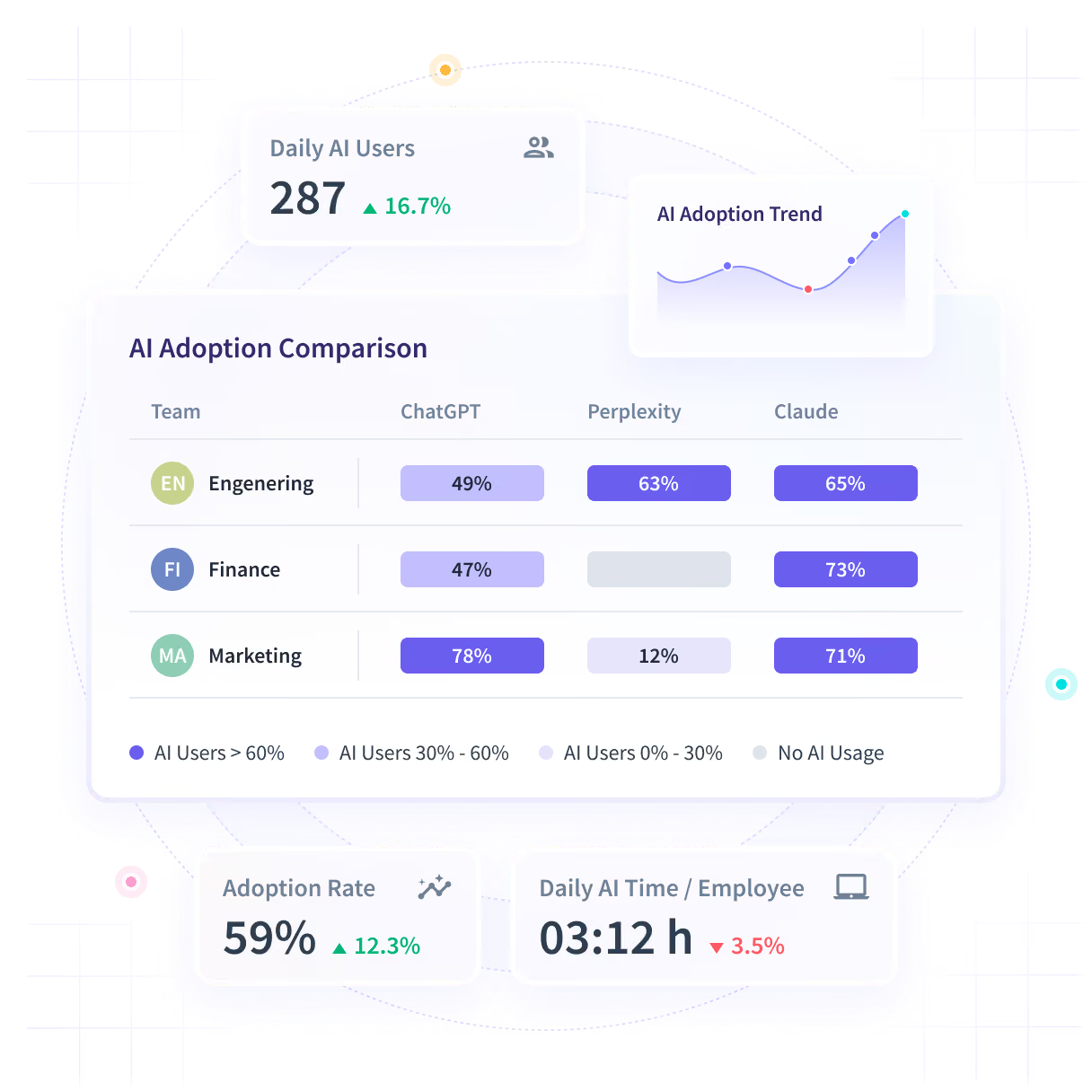
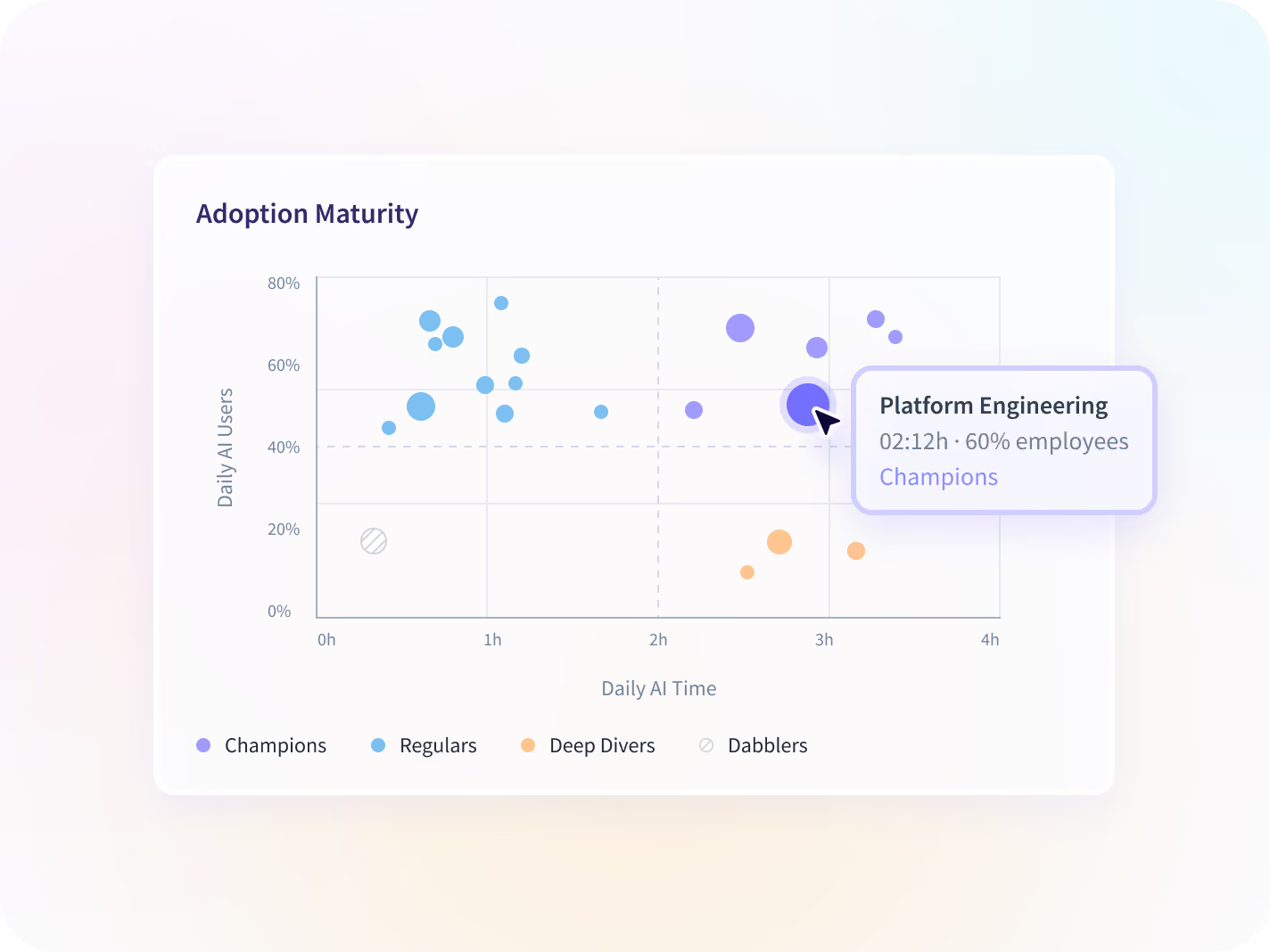
Every team is plotted on how widely it uses AI and how deeply, so a team that opened a tool twice reads differently from one that runs on it. Same Insightful desktop application, no content or keystrokes captured.












Nobody logged which teams turned the AI seats into work
Seats were bought on a promise and renewal is in six weeks. The license console shows who has a seat, not who opened it twice and stopped.

Price the renewal on use, not on who got a seat
Every team lands on the Adoption Maturity Matrix as a Champion, Regular, Deep Diver or Dabbler. A license console shows all four as fully licensed.
.svg)
Seats opened, not assigned
A license console says who holds a seat. This says who opened it, how often, and whether anybody went past the first week.

No tool to instrument
Usage comes off the desktop application already deployed, as the work happens, so a tool that appeared last week is in the report without a project to add it.

The tools nobody rolled out
Applications nobody registered are flagged when they first appear, which is how a private AI account reaches a report at all.

Adoption is not outcome
None of it proves the AI caused a result. It shows who uses which tool and how much, so a renewal argument starts from measured use. The outcome number stays with the team that owns it.
See AI use across every tool, with nothing to instrument
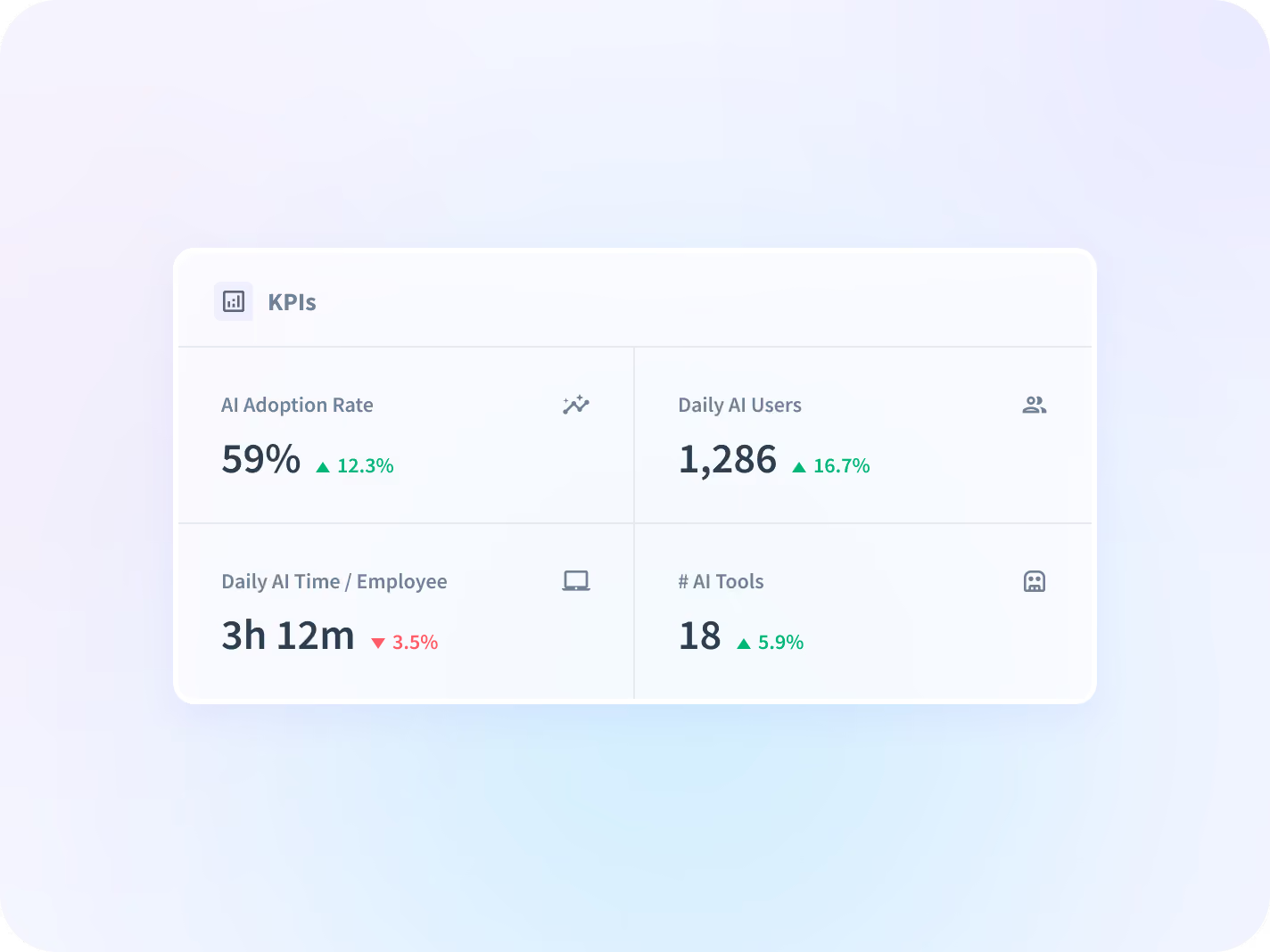
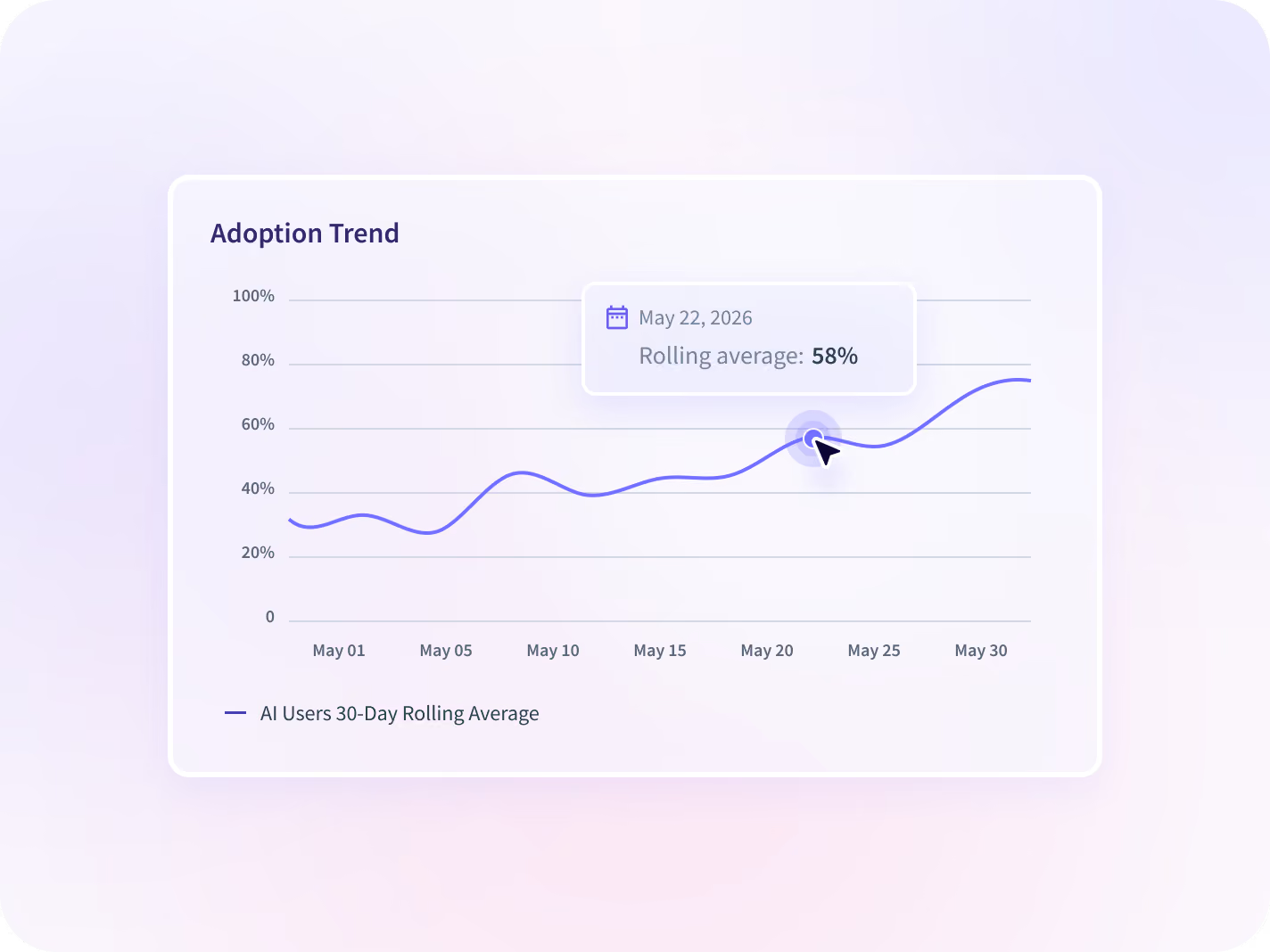
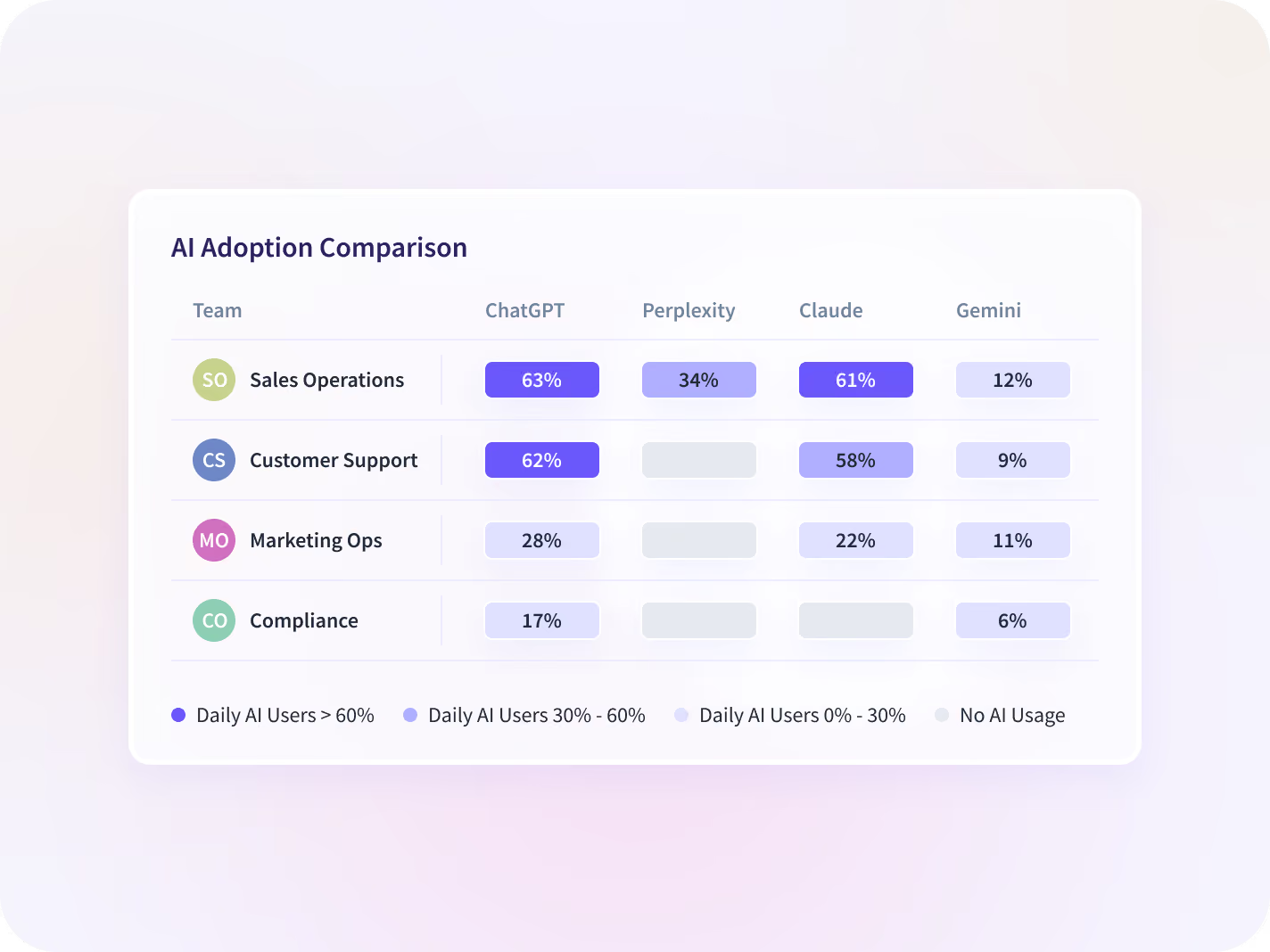
Four numbers on how much AI is being opened, a rolling average on which way that is moving, every team plotted by breadth and depth, and every tool set against its seats. All off the desktop application already deployed.


Four numbers carry it: daily AI users, AI time per employee, adoption rate and how many tools are in use, read by team and across the organization.


A rolling average says whether adoption is accelerating, holding or losing ground, so a rollout that stalled in month two is visible before the renewal date.


Every team plotted across breadth and depth as Champions, Regulars, Deep Divers or Dabblers, which is the difference a license console cannot show you.


Every AI tool side by side against the seats opened, so the one nobody moved past the trial is visible before its renewal date rather than after it.
Turn an adoption number into a budget decision
An adoption number says how much AI is being opened. Add what the line costs, the tools nobody rolled out and the rest of the stack ranked the same way, and you can price each tool on its own instead of approving the whole invoice.

AI Spend
What the AI line costs against the seats people open, so a renewal is priced on use rather than on the purchase record.

Shadow AI
AI tools nobody rolled out, surfaced by application visibility today. Flagging against your own approved list is rolling out.
AI Adoption
The measurement counterpart: setting a baseline, picking the numbers, and reporting adoption to the people funding it.

Apps & Website Usage
The rest of the stack ranked the same way, so an AI seat is judged against the tools it was meant to replace.

Productivity Trends
Whether the teams furthest into AI show a different direction in productive time from the teams that are not.

Workspace Security
The same visibility under a collection scope narrow enough to clear a legal review. An add-on to Workforce Analytics.
Four teams stop guessing at the same AI rollout
The AI renewal defended by the team that asked for it
Compare every AI tool side by side against seats opened, and renew, resize or drop each one before the date rather than after.
Cost per active AI seat
The per-tool integration project
Get AI usage from the desktop application already deployed, with no new rollout and no vendor-by-vendor instrumentation.
Rollouts avoided
The AI usage survey nobody returns
See which applications people opened to do the work, including tools nobody rolled out, with no content and no keystroke capture.
Unapproved tools surfaced
Enablement delivered to everyone equally
Separate the teams that can mentor from the teams furthest behind, and spend the training budget on the second group.
Adoption rate by team
Which AI tool was opened, never the prompt
The report records which AI tools were opened, how often and for how long. Prompts, responses, content and keystrokes are outside the collection scope, and what gets collected is agreed before deployment rather than discovered after.






Trusted by 5,000+ Teams Worldwide






Price your next AI renewal on use
No connector for the AI tools, 50+ for everything else
AI use comes off the desktop application already deployed, so nothing is instrumented per vendor and a tool that appeared last week is in the report. The 50+ integrations cover payroll, HRIS and project systems.


FAQ
By pairing the cost side, licenses held versus seats opened, with the usage side, how much of each team's work now runs through an AI tool. Insightful supplies both from one source, so the case doesn't rest on a survey nobody returned. Daily AI users, AI time per employee and adoption rate carry the usage side, and every team is plotted on the Adoption Maturity Matrix as Champions, Regulars, Deep Divers or Dabblers. The outcome number stays in the system that already holds it.
Yes, as a usage finding rather than a policy verdict. Application and website visibility ships today and covers unapproved tools, including AI tools, so an application nobody registered is flagged when it first appears. Angel Maldonado, in IT at Fulton Management, named private-account AI use during his evaluation, before anyone had asked him about it. Flagging against your own approved list is rolling out, and Shadow AI carries that argument in full.
It records which AI tools are opened, how often and for how long, from the same Insightful desktop application as the rest of Workforce Analytics. Prompts, responses, content and keystrokes are outside the collection scope.
Commonly used assistants including ChatGPT, Claude, Gemini and Cursor are recognized automatically. Confirm the recognized list against your own stack before you plan around it.
Start from where teams already are, not from a target date. The Adoption Maturity Matrix sorts every team into Champions, Regulars, Deep Divers and Dabblers, which turns a roadmap into a sequence: mentor out of the first group, coach the last. It is a plan for where people's time goes, not a number to announce.
Ours is the Adoption Maturity Matrix: every team plotted across breadth and depth as Champions, Regulars, Deep Divers or Dabblers. It answers where to spend the enablement budget, because a Dabbler and a Deep Diver need opposite things from you. What it will not tell you is whether the work itself got better. That comparison is yours to make, against an outcome number you already keep.
It is included. It is part of Workforce Analytics, on the desktop application you already have. Workspace Security is the add-on, and that one is purchased alongside Workforce Analytics rather than included in it.


