


Remote Employee Monitoring Software for Clearer Visibility
Time and activity data for remote employees and contractors, across time zones. Nobody has to report their hours.


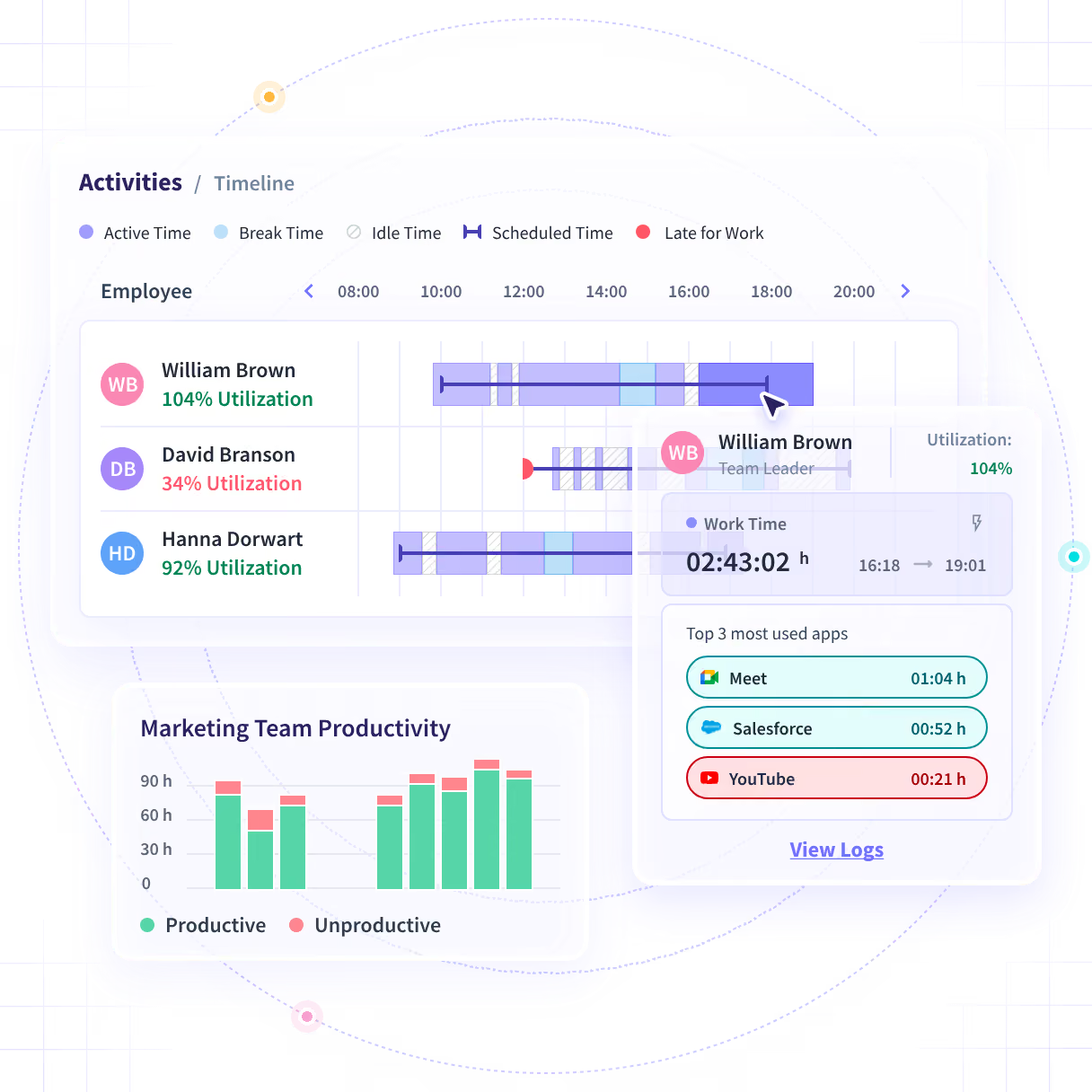



Scaled without losing millions to work fraud.

Up from the high 70s at one Farmers agency.

Scaled with schedule adherence held above 90%.
Stop chasing remote teams for updates
Most remote teams report hours and progress after the fact. Insightful records them on each work computer as the work happens.

Without Insightful

You learn about the week from what people chose to write down.
Half the team works while you sleep, so a stalled task shows up late.
Agency and contractor time is billed from timesheets nobody checks.
Someone works late for a month, and nobody notices until deadlines slip.
A manager says the team is stretched. Nobody can show the hours.

With Insightful

Active and idle time, apps and projects, captured on the work computer.
Hours and schedule adherence for every location, in local working time.
Contractors set up like employees, with a scoped login for clients.
Hours, meetings and after-hours work by person, before deadlines slip.
Utilization by team and person, so hiring rests on recorded hours.
Will it work for your remote team?
If the work happens at a computer, yes, wherever that computer is. Employees, contractors and teams in other countries use the same desktop application and reports.

Contractors included

Teams in any country

No seat minimum

Pick where data sits


Desk-based work only. No mobile app and no GPS, so field, driving and warehouse teams need a different tool.
See your remote team's week in one report
Track remote hours without a timesheet
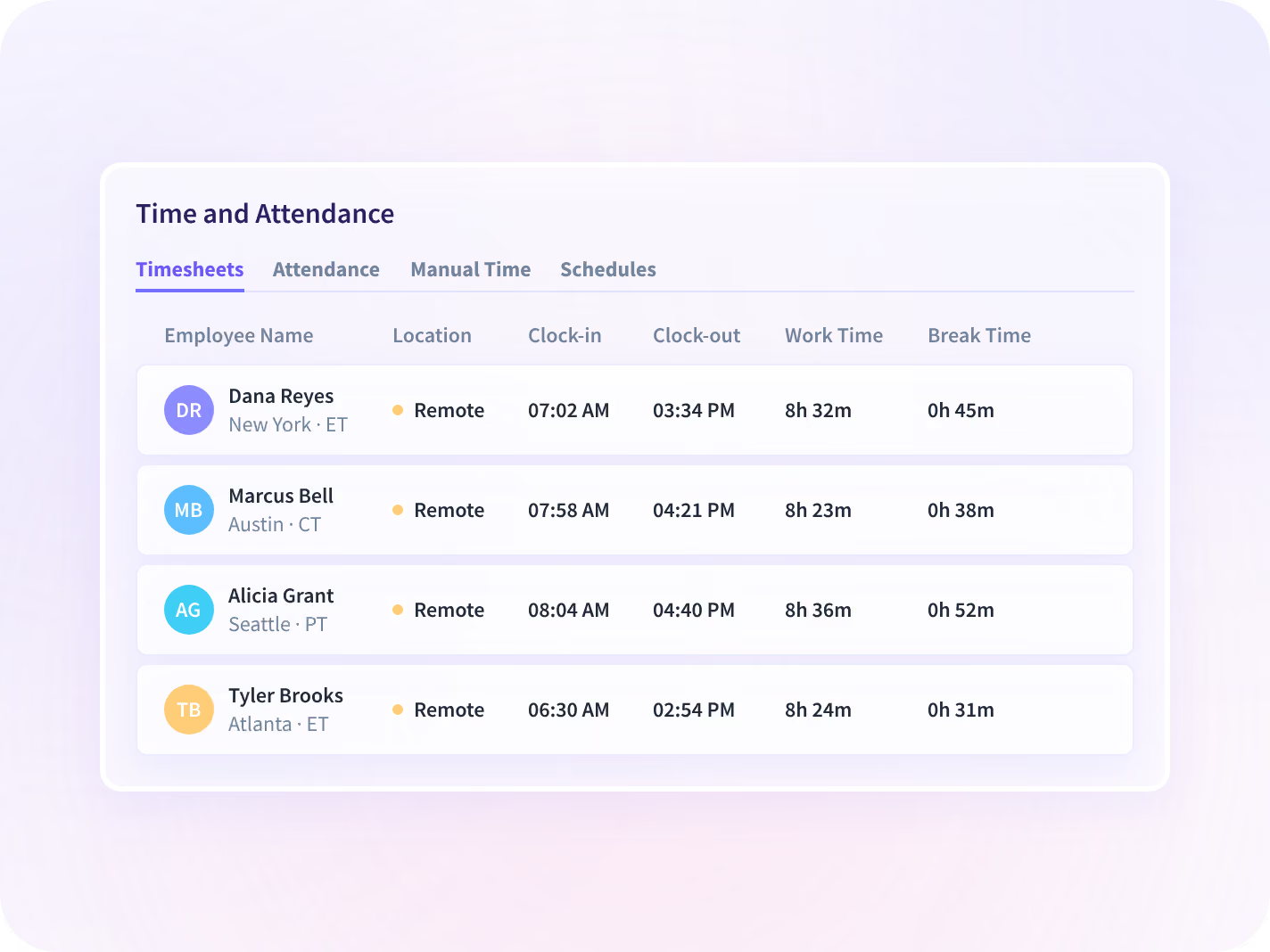
A team spread over four time zones never clocks in at one desk. Insightful records start, finish and breaks on each computer, in local time. Manual edits go to an approver.
- Capture start, finish and breaks for remote staff
- Check schedule adherence in each person's local day
- Route manual time edits to a named approver
Spot an overstretched remote team early
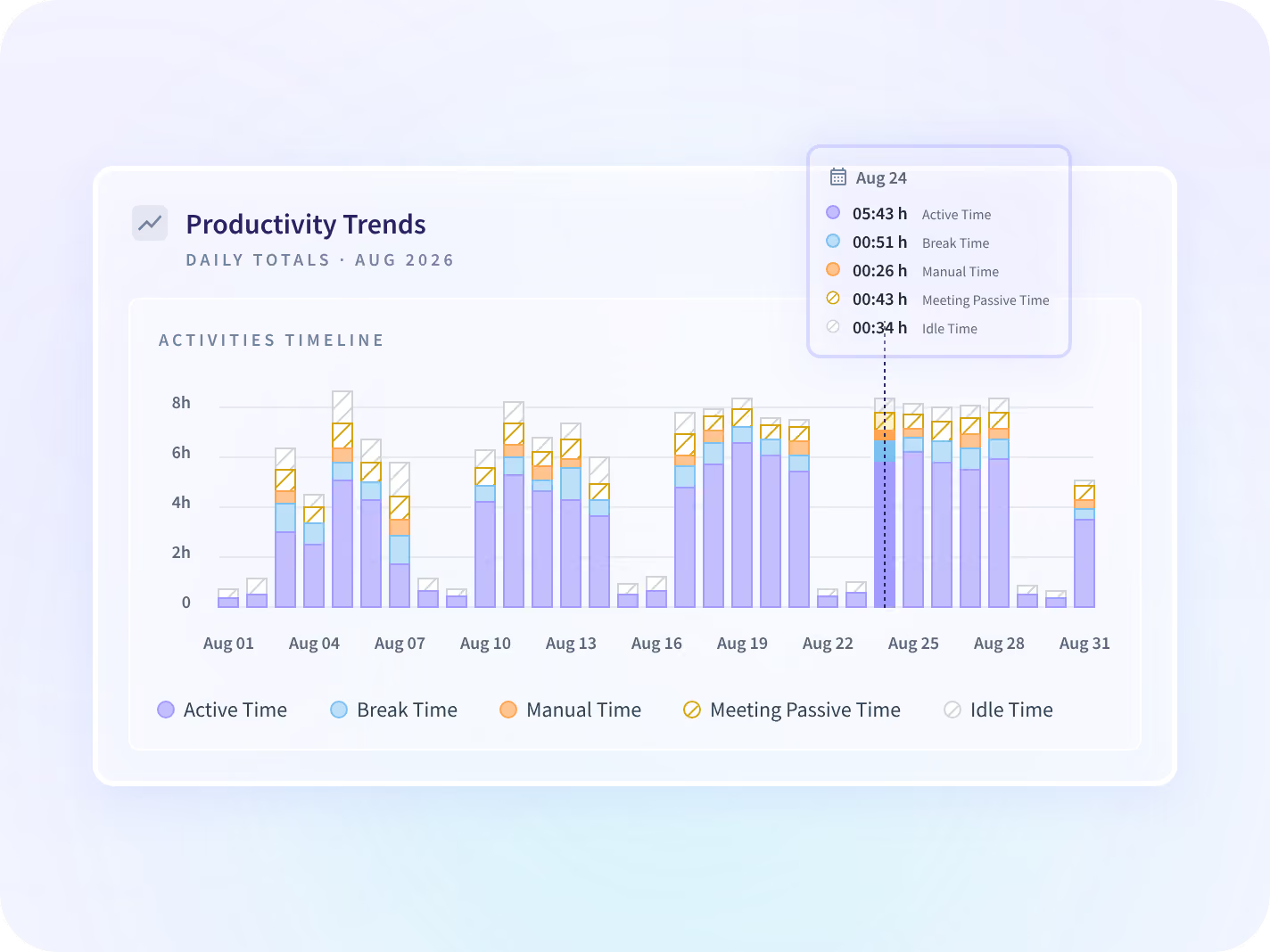
From a distance, a coping team and a struggling team look the same. Utilization, productive time and after-hours work are reported by team, against the period before.
- Compare utilization across remote teams and time zones
- See who is working late, week after week
- Rebalance remote workloads using recorded hours
Show clients the work behind each invoice
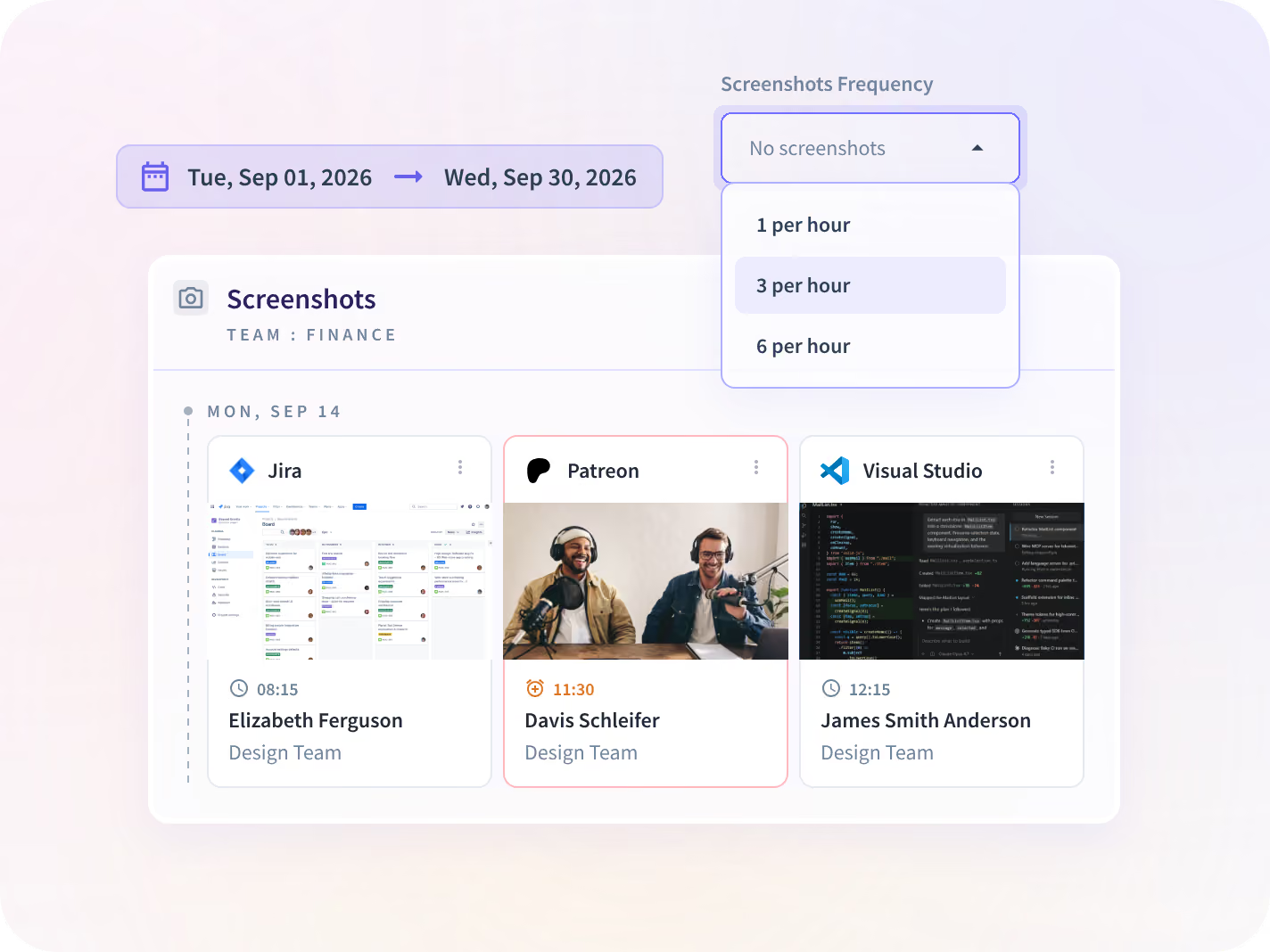
Outsourced and agency teams bill for hours a client never saw. Project time and screenshots sit behind a client login scoped to that account. A queried invoice gets a record.
- Log remote time against each client's projects
- Share a client login scoped to one account's hours
- Back up disputed hours with filtered screenshots

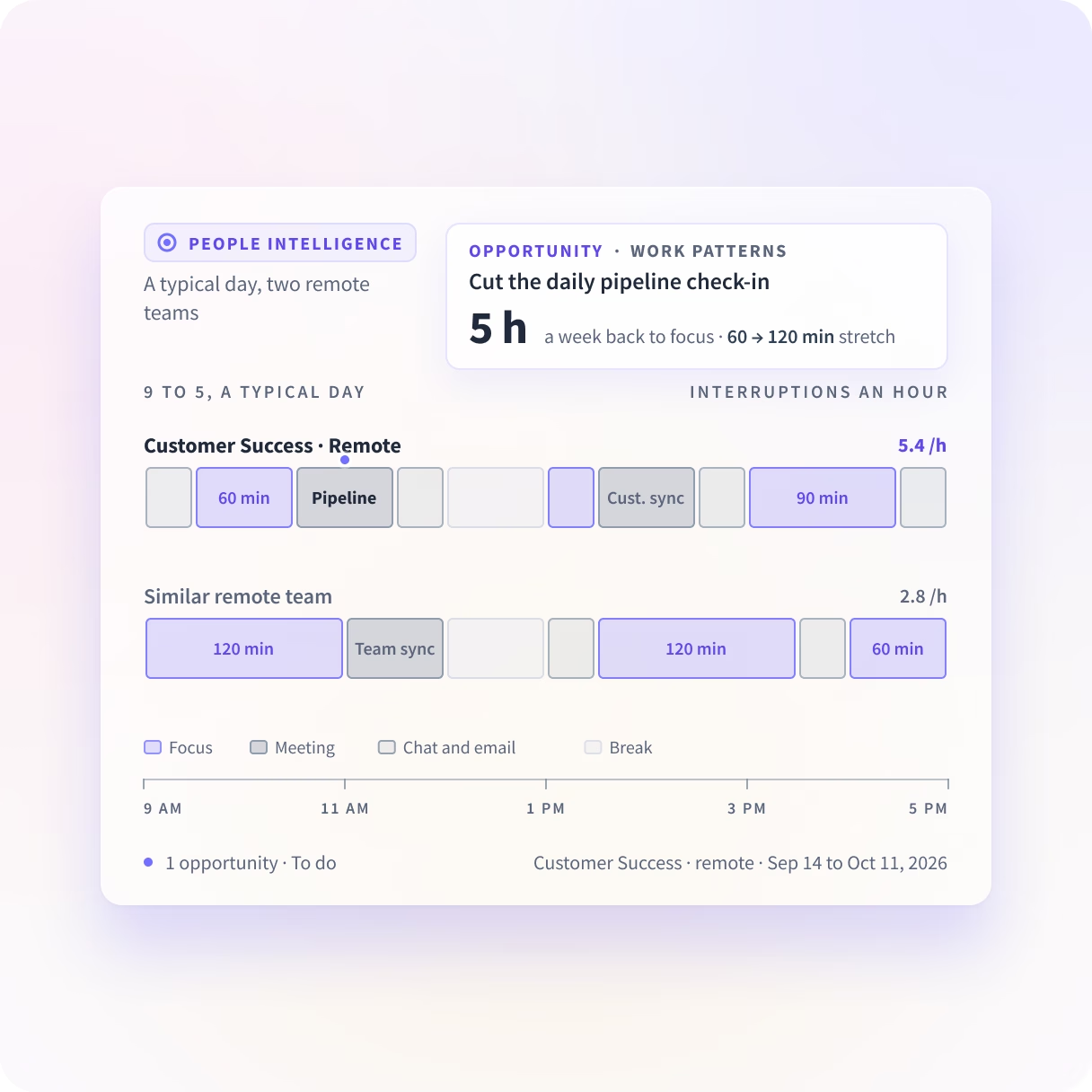
How do your remote teams spend the workday?
People Intelligence shows where meetings and chat leave remote teams no time to focus. It suggests what to cut so you can reclaim focus time and allow your teams to execute.


Get Your Remote Policy Checklist
Insightful’s free Report includes a checklist for implementing your own remote monitoring policy, backed by the latest industry research and best practices.
Get The State of Remote Work Productivity 2026
- Know the Numbers. See where teams work in 2026, from BLS, Gallup, and Stanford.
- Weigh the Evidence. Find out what 82 studies say about remote work and productivity.
- Build Your Own Policy. Use our monitoring policy checklist before rolling out yours.
- Measure What Matters. Use our metrics worksheet to pair outcomes with capacity.

One security standard in every country
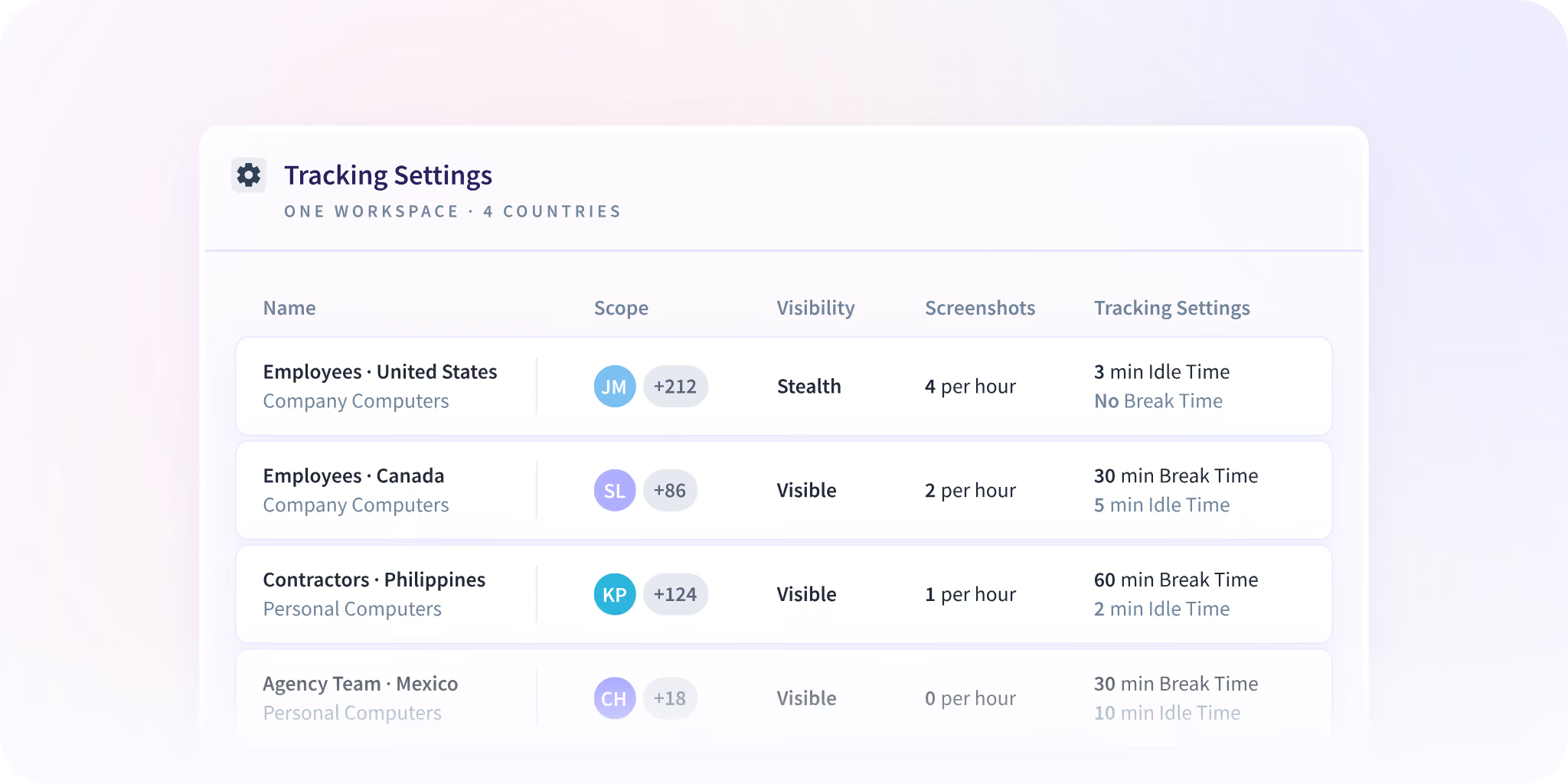
Capture settings are set per team before rollout. A team under stricter local rules can run a narrower setup than the rest of the company.






Trusted by 5,000+ Teams Worldwide
Remote operations leaders on what changed once the hours were visible.






Connect the tools your remote team runs on
Jira, Asana, ClickUp, GitHub, BambooHR and 50+ others. Time on projects lands where your team plans the work.


Manage remote teams on recorded hours
Managing Remote Teams in 2026: A Complete Guide to Visibility, Productivity, and Accountability
Last updated: November 2026
Managing remote teams well comes down to three things: clear expectations, a steady check-in rhythm, and enough visibility into workload to support people before small problems grow. This guide covers how to manage remote employees day to day, how to monitor remote employees without micromanaging, and how to choose remote employee monitoring tools that support good management instead of replacing it.
01: What does managing remote teams look like in 2026?
Managing remote teams means agreeing on what good work looks like, keeping a predictable communication rhythm, judging people on results rather than hours online, and seeing workload early enough to rebalance it. Most remote-capable teams are now hybrid, so the same practices have to work at home and in the office.
According to Gallup's August 2026 data, 54% of remote-capable U.S. employees work hybrid, 25% work exclusively remote, and 21% work on-site.
{{divider-1}}
02: Why is managing remote employees harder than managing in-office teams?
Remote work removes the informal signals managers rely on in an office: who looks stuck, who is overloaded, who has gone quiet. Without them, managers navigate risks that are common among remote teams:
- Little training. Only 21% of hybrid workers and 28% of hybrid managers had received training on working in a hybrid arrangement, in Gallup's 2024 survey.
- Low confidence. In Gallup's May 2025 survey, only 54% of managers of remote workers strongly agreed they trust their teams to be productive. The rest tend to compensate with extra meetings and status requests.
- Hidden workload. Overtime, late-night messages, and uneven workload can remain invisible until someone burns out or leaves.
- Proximity bias. A study of 937 UK managers found that, without performance information, full-time remote workers were 11% less likely to be promoted and hybrid workers 8% less likely than office-based staff.
- Time zones. Handoffs slip and meetings creep into evenings. Microsoft's 2025 Work Trend Index, which is vendor research, found meetings starting after 8 p.m. were up 16% year over year.
Most of these gaps close with clearer norms and better information, not more meetings. The practices below cover the norms; chapters 04 to 07 cover the information.
Want the research behind remote work productivity? Download Insightful’s The State of Remote Work Productivity 2026 for the latest data and a policy checklist you can fill in. Download the report →
{{divider-2}}
03: Remote team management best practices
Remote team management best practices come down to a few habits done every week. In this section we examine each:
- Set clear expectations for every role
- Agree a team collaboration plan
- Match each type of message to the right channel
- Check in weekly
- Measure results, not activity
- Prevent burnout before it starts
[fs-toc-omit]How do you set clear expectations for remote employees?
Write down what success looks like before the work starts. For each role, agree on the quarter's top priorities in ranked order, availability windows (including overlap hours across time zones), expected response times for chat, email and urgent requests, and success criteria written as results, such as tickets resolved or projects delivered.
Clarity pays off. Gallup found that employees who strongly agree they know what is expected of them are 47% less likely to experience frequent burnout.
[fs-toc-omit]How do you create a remote team collaboration plan?
A collaboration plan is a short written agreement on how the team works together: when people overlap, how they show they’re unavailable, which meetings are fixed, and where decisions get recorded. In Gallup’s 2024 survey, hybrid workers on teams with a plan were 66% more likely to be engaged than those without one, yet 48% were on teams that had never discussed one.
Let the team write the collaboration plan together and review it every quarter. Gallup found that 91% of employees call a schedule fair when their team decides it, against 73% when the employer does.
[fs-toc-omit]Which communication channels should remote teams use?
When channels have no rules, focus time gets fragmented and everything becomes a ping. Agree which channel handles which need, and how fast people should reply:
Insightful’s guide to cutting meeting overload examines how teams can move status updates out of the calendar and into written channels.
[fs-toc-omit]How often should you check in with remote employees?
Weekly. Gallup’s manager research recommends short conversations of 15 to 30 minutes every week, which have more impact than longer ones held less often. A simple rhythm: team planning on Monday to confirm priorities and blockers, 1:1s midweek on progress, obstacles, workload and development, and wins and recognition on Friday.
[fs-toc-omit]How do you measure remote work by results instead of activity?
Start with the outcome each role owns, such as cases closed, features shipped, or accounts renewed. Activity data (hours, focus time, app usage) should connect to a result: whether a missed target came from too many meetings, an overloaded week, or a blocked dependency. Chapter 06 lists the KPIs that work for remote teams.
{{banner-1}}
[fs-toc-omit]How do you prevent burnout on a remote team?
Remote burnout builds when managers can’t see where their people spend time, or how to best utilize it. The result is employees whose workloads create long hours, evening work, or weekends log-ins.
Four habits can help:
- Make workload visible at team level, so overload becomes a team problem rather than a private one
- Protect focus time with meeting-free blocks or a meeting-free day
- Set availability boundaries, and keep them yourself
- Judge outcomes, so nobody feels they must look busy late at night
Work activity data makes this easier to act on. A team running at very high utilization with most of its day in meetings is a team to rebalance; see how teams spot burnout risk.
{{divider-3}}
04: How do you monitor remote employees without micromanaging?
Successfully implementing Workforce Analytics starts with deciding what operational question the data answers, and setting a policy outlining what’s collected (and what isn’t) before you start.
Gallup’s September 2026 study found that teams’ openness to monitoring depends on purpose: 62% were comfortable with activity data used for team effectiveness, against 53% for performance reviews, and trust was higher where leaders had talked about data use openly.
[fs-toc-omit]How do you introduce monitoring to a remote team?
Below are five proven steps for success:
- Define the purpose. Write down the questions the data should answer, such as workload balance or billable-hour accuracy.
- Write the policy. List what is collected, what is never collected, who can see what, and how long data is kept. Have counsel check it against the prevailing regulations where your employees work.
- Tell people before you start. Whenever your use case allows, announce the rollout, explain the purpose, and answer questions in an open session.
- Give employees their own dashboards. People who can see their own data use it to plan their time, and they trust the numbers more.
- Review it every quarter. Adjust the policy with employee feedback.
Our guide to writing an employee monitoring policy walks through step 2, and the report includes a policy checklist you can complete before rollout.
{{divider-4}}
05: What are remote employee monitoring tools?
Remote employee monitoring tools collect work data, such as hours, app and website usage and project time, from work computers so managers and employees can see where time goes. Some only log hours. Others show how time splits across apps, meetings, and projects. The most useful ones connect these in one place.
Screenshots are an available feature in many tools. They work best as a part of the broader productivity picture, rather than the sole measure.
{{divider-5}}
06: Which remote team KPIs should you track?
Track two kinds of KPI together. Outcome KPIs show what the team produced; capacity KPIs show what it took to produce it. Output rising with steady hours is healthy. Output rising alongside after-hours work is a risk to flag.
Take a baseline before any change to how the team works, and compare teams doing similar work rather than one person against another. To improve remote work productivity, see these data-backed tips.
{{divider-6}}
07: How do you choose remote employee monitoring software?
Choose remote employee monitoring software on fit: it should match how your team works, what your security team needs, and how much you want employees to see. Before you compare vendors, answer five questions:
- Is your team fully remote, hybrid, async, or shift-based?
- Do different departments need different levels of detail?
- Do you handle regulated or client-sensitive data?
- Do you want employees to see their own data?
- Does all or most of the work happen at a computer?
Then check each platform against these criteria:
- Automatic time tracking. Hours are recorded in the background, with manual entries only for work done away from the computer.
- Settings per team. You can choose what is collected for each team, and turn features off where they don’t fit.
- Optional employee-facing dashboards. People can see the same data about their own work that their manager sees.
- Location context. You can compare office, remote, and hybrid activity data.
- Security and deployment. Look for an audited security report, role-based access, and the deployment option your IT team needs.
- Integrations. Hours connect to your project tools, HR system, calendar, and more.
{{divider-7}}
08: How does Insightful help you manage remote teams?
Insightful’s Workforce Analytics shows where people spend time and how to best utilize time. It runs from one desktop app on Windows, macOS, and Linux, records hours automatically, and offers optional employee dashboards so that teams can see their own work data.
- Timesheets and Attendance tracking fill in every shift automatically, and Manual Time Entry covers meetings and offline work, with manager approval.
- Productivity Trends shows how utilization and productive time change for every team, compared with the period before.
- The Communication Report shows how each team’s day splits between meetings, calls, messages, and focus time.
- Apps & Websites shows which tools your teams actually use, so license renewals are based on actual value to your team.
- The AI Adoption Report shows which teams use AI, and how much.
- The Location Insights Report shows work and productive time on office, remote, and mixed days.
- Integrations with nearly 80 tools, including Jira, Asana, ClickUp, and more.
Insightful sees the apps, sites, and AI tools your people use, and how they use them. It does not log content or capture keystrokes, messages, and documents.
Screenshots are off and blurred by default, and Tracking Settings let you choose what is collected for each team. We recommend a visible rollout with employee-facing dashboards.
Insightful holds a SOC 2 Type II report, audited annually, and runs in the cloud (US or EU) or on-premise; see the security page.
Remote teams use the data to make decisions that they used to make on instinct:
- TRG boosted productivity 76% and cut tool costs 56%.
- Peach Payments cancelled a return-to-office initiative after the data showed its remote teams were more productive.
- Caduceus Health reduced call abandonment from 14% to 3%.
{{banner-2}}
See how Insightful People Intelligence shows how teams work and suggests opportunities to improve their output
See where your remote team’s time goes
What remote team leaders ask us most
How it works, who it fits and where the data sits, for teams that work remotely.
Remote employee monitoring software analyzes how distributed teams spend their work hours. It empowers work-from-home teams by combining automated time tracking, app and website usage, and productivity trends in a single platform. Unlike invasive surveillance, Insightful's approach to work-from-home monitoring software focuses on work patterns rather than personal content, with no keystroke logging.
Remote work monitoring software ensures your people are working as scheduled with the expected output. This keeps your productivity high wherever your team works from and enables you to continue to offer the WFH flexibility that modern employees want.
No. Insightful records time, activity, and app and website usage without logging what employees type. It shows how work happens, not the content of individual keystrokes.
No. Insightful is a work insights platform. It collects hours, application use and meeting load from desk-based teams and reports them by team, each measure against the period before. It runs on the Insightful desktop application installed on a computer, and there is no mobile app and no GPS layer. It fits a remote team already working at a computer for most of the day: support, finance, claims, engineering, back office, customer operations. A workforce whose remote work happens in a vehicle, on a job site or on a warehouse floor is a better fit for a mobile-and-location tool.
Yes. Contractors, BPO agents and agency staff are set up the same way as employees, and a client login gives an end client a scoped view of the hours worked against their account without giving them access to the rest of the workspace. Hours come from the desktop application rather than from anyone's self-reported entry, so they are measured as work happens, not reconstructed afterwards. Mercor uses this at 30,000-plus contractors.
There is no minimum. The 7-day trial is full access with no card. The reporting earns its keep once there are enough people that a manager can no longer hold the week in their head, which in practice is somewhere around fifteen to twenty.
Yes. Data residency is available in the US, the EU and Saudi Arabia, with on-premise deployment for organizations that need the data inside their own perimeter. Capture settings are set per team, so a team in a jurisdiction with stricter rules can run a narrower configuration than the rest of the organization.
The best remote employee monitoring software combines automatic time tracking, activity insights, and productivity trends without invasive surveillance. Insightful fits that criteria, pairing enterprise-grade security with employee-facing dashboards that allow tracking to be transparent rather than one-directional.
Workforce Analytics shows the input, from the time perspective. People Intelligence shows the output, and what happens in between.
For remote teams, it shows the day's share in meetings and chat, and what lands after hours in local time. We see the apps, sites and AI tools your teams use, and what they do in them.
Set written expectations for every role, agree on a team collaboration plan, and hold short weekly 1:1s focused on blockers and development. Judge people on the outcomes they own rather than hours online, and use time and workload data to rebalance work early. Apply the same goals and metrics to every work location.
Start with a written policy that states the purpose, what is collected and who can see it, and tell employees before the rollout. Use a remote employee monitoring tool that records time and app usage automatically, give employees their own dashboards, and review the data in 1:1s alongside each person's goals.
Yes, employee monitoring is legal in most countries. In the US, the Electronic Communications Privacy Act (ECPA) allows employers to track employee activity on company-owned devices for business purposes. Some states have additional regulations around notifying employees. In the EU, GDPR regulations allow for monitoring for legitimate, documented reasons. See our overview of employee monitoring laws. This is general information, not legal advice.
Avoid judging people solely by their “online” status, or changing what is collected without notice. Watch for proximity bias too: without performance information, managers in one UK study were less likely to promote remote workers than office-based staff. Use the same goals for every work location.
Weekly. Gallup recommends 15- to 30-minute conversations every week, which have more impact than longer ones held less often. Use the time for progress, blockers, workload, and development rather than status updates a dashboard can show.


