.svg)


Workflow Management Software: What It Does, What It Can’t Tell You, and How to Choose
What workflow management software does, the categories buyers confuse, and the questions separating a tool that runs work from one that shows how it ran.




On this page
Measure the work, not the signal.
See productive time and utilization by team, not just what looks active.


Key takeaways
- Workflow management software runs and routes work through a defined sequence of steps, assigning tasks and showing status as work moves from one person to the next.
- It differs from workflow automation, which removes human steps entirely, and from project management software, which plans finite work rather than routing recurring work.
- Evaluating a workflow tool means asking what work it needs to cover, how much routing configuration it requires, and what it can show about work that happens outside it.
- The visibility gap matters most: a workflow tool records what it was told to expect. Rework, exceptions, workarounds, or wait times taks are picked up often go unmeasured.
Ask three vendors what workflow management software does, and you’ll get three different answers. There’s a lot of overlap between automation, project management, and process management. The confusion and ambiguity results in customers buying a tool that works well enough, but isn’t optimized for the actual problem they set out to solve.
Workflow management software runs the workflow. It records what it was asked to do, nothing more. Work that stalls between steps, or gets done outside the tool entirely, never enters the system that is supposed to be managing it.
A workflow tool is a faithful record of the path it was told to expect. It has nothing to say about the work that happened outside those constraints.
What is workflow management software?
Workflow management software coordinates a sequence of tasks through a defined path, assigning work to the right person at each step and moving it forward once a step is completed. It routes work rather than performing it, and exists so a multi-step process runs consistently regardless of who is doing each part.
Core capabilities of workflow management software cluster around a few functions:
Routing. Moves work along the defined path, deciding what happens next based on rules set up in advance.
Assignment. Puts each task in front of the right person or team, without someone manually deciding who picks it up.
Status. Shows where a given piece of work currently sits in the sequence, so anyone checking can see it without asking around.
Approvals. Routes a task to whoever needs to sign off before it can move forward, and holds it there until that happens.
Notifications. Alerts the right person when a task is waiting on them, rather than relying on someone to remember to check.
Reporting. Summarizes how work moved through the process, usually as counts, durations, or backlogs by stage, giving a manager a view across the whole queue rather than one case at a time.
What workflow management is at its core comes down to this coordination function. The software doesn't decide what the work is, and it doesn't do the work itself. It decides who touches it next, and it keeps a record of that sequence as it happens.
The four categories buyers confuse
Four adjacent categories get confused constantly. Picking the wrong one produces a specific, predictable symptom rather than a vague sense that the tool isn't working.
The confusion is understandable, since all four revolve around the same underlying idea: work moving from one state to another. But there is clear differentiation.
Workflow management software:
- assumes the work is ongoing and repeatable. This separates it from project management's finite scope.
- assumes a person is still involved somewhere in the sequence. This separates it from workflow automation's fully hands-off approach.
- operates at the level of a single team's process. This separates it from business process management's organization-wide scope.
A team choosing between these usually isn't choosing on features. They're choosing on scope: how repeatable the work is, how much of it still needs a person, and how many teams the process touches.
Getting this wrong rarely shows up right away.
A team that picks workflow automation for a process that still needs human judgment discovers the gap only when the first real exception hits. By then, the automated path is already the default everyone relies on.
A team that picks project management software for a recurring process ends up recreating the same project every week, since the tool has no concept of a process that simply keeps running.
A team that picks business process management for a single department's workflow often finds itself waiting on governance cycles built for the whole organization. Those cycles were never meant for one team's queue.
The reverse mistakes happen too. Choosing workflow management for something that's really a finite project means building routing logic for work that will only happen once, which is more setup than the task deserves.
Choosing workflow management for something that genuinely needs full automation just leaves a person in the loop who never should have been there in the first place.
Core features worth having
Beyond the core category question, a handful of specific features separate workflow management tools that hold up under real use from ones that look superficially complete in a demo:
Visual builder. A drag-and-drop way to design the workflow matters because the people who understand a process best are rarely the ones who can write logic for it. A visual builder lets a process owner build and adjust the path directly, without routing every change through a developer.
Conditional routing. Work rarely follows one path. Conditional routing lets the tool send a case down a different route based on its specific details, rather than forcing every case through the same sequence regardless of what it needs. Without this, exceptions either break the workflow or get handled entirely outside it.
Role-based assignment. Assigning work to a role instead of a specific person means the process keeps running when someone is out or a team changes shape, instead of breaking every time headcount shifts. A workflow built around named individuals needs to be rebuilt every time someone leaves.
SLA and escalation handling. A defined time limit on each step, with a clear escalation path when that limit is missed, is what keeps a stalled task from sitting quietly until someone happens to notice. Without it, a case can wait indefinitely as long as nobody goes looking for it.
Integrations. A workflow tool that can't connect to the systems work touches, like email, a CRM, or a document store, ends up as one more disconnected step rather than a real coordination layer. Work still has to be manually copied in and out of it.
Audit trail. A record of who did what, and when, matters for compliance and for troubleshooting when a case goes wrong. Without it, reconstructing what happened means asking people to remember, which gets less reliable the longer ago the case closed.
Reporting. Built-in reporting on volume, duration, and backlog by stage is what turns the tool from something people use into something a manager can see across. A tool without this reporting still runs the work, but nobody can tell how well it's running without exporting data manually.
How to evaluate workflow management software
Most evaluations of workflow software focus on features. The questions below focus on what happens once the software is running real work, past the demo case.
- What work does it actually need to cover?
- How much configuration does routing require?
- What happens to exceptions that don't fit the defined path?
- What does it record about how long each step took?
- Can it show work that happened outside the tool?
- What does reporting actually answer, versus what it appears to answer?
- What does it cost to change a workflow after go-live?
Scope of coverage. Before comparing features, get specific about which work this tool needs to run. A tool sized for one team's approval process is a different purchase than one meant to run workflows across a whole department.
Routing configuration. Some tools require a specialist to build and maintain routing logic. Others let a process owner adjust it directly. Know who will be doing that work six months in, not only at launch.
Exception handling. Every real workflow has cases that don't fit the defined path. Ask what happens to them: do they get flagged for manual handling, do they stall silently, or does the tool have no real answer at all?
Step-level timing. Some tools record how long each step took. Others only show whether a case is open or closed. That difference determines whether a slow process can ever be diagnosed by stage, or only judged by its total time.
Visibility outside the tool. Almost no real process happens entirely inside one system. Ask what the tool can show about work that happens in email, a spreadsheet, or a phone call between two formal steps.
What reporting really answers. A report can show volume and average duration without showing where a process breaks down. Ask for an example of the exact question a manager would need answered, and see whether the report answers that question or a different one.
Cost of change. A workflow that looks stable during the sales process will change. Find out what it costs to modify a live workflow once it's running with real cases inside it, including the time and capacity it takes up.
What these tools can’t tell you
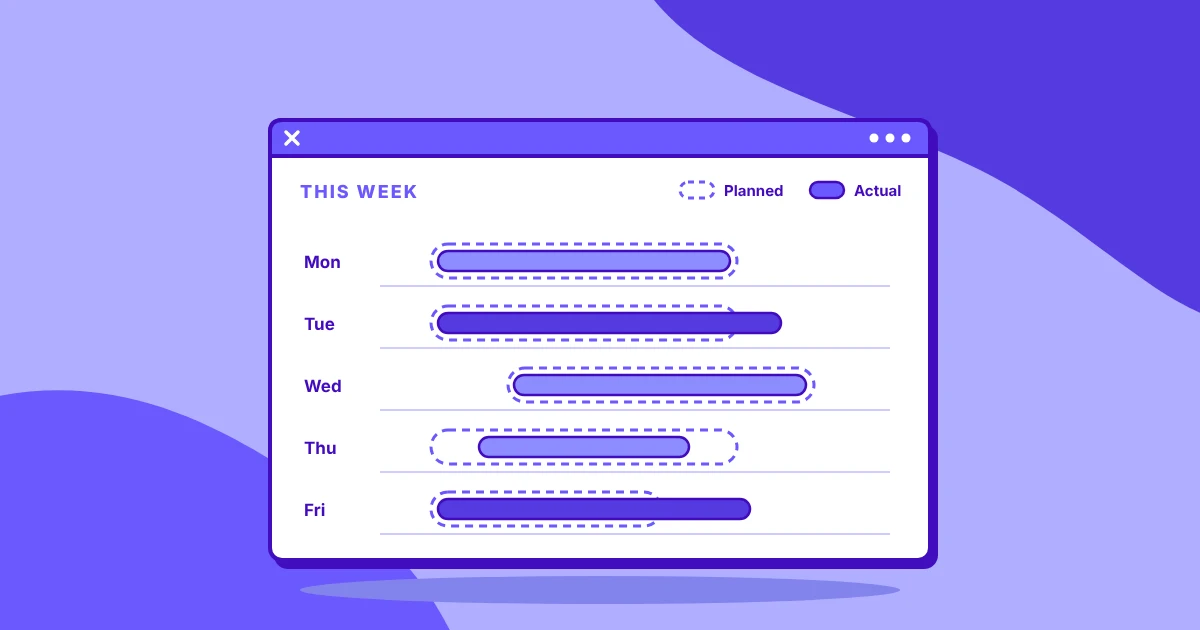
A workflow management tool records the transitions it was built to record. It does this well and consistently. The limitation is scope, not accuracy: a lot of real work happens outside what the tool was ever set up to see.
One blind spot is the time before a task is picked up. A task can sit in a queue for hours before anyone starts it, and the tool has no way to distinguish that wait from the time spent doing the work. Unless someone specifically logs the moment work was assigned and when it began, the wait time is lost.
Work done in email or spreadsheets between formal steps is another. A step often requires research, a conversation, or a calculation that happens entirely outside the tool, but only the finished result gets entered back in. The context of what it took to produce the result, or how many people were involved, goes unrecorded.
Rework is the third measurement error, and often the largest. A case that gets sent back, redone, and resubmitted usually shows up in the tool as if it simply took longer the first time. Unless the tool captures rework as its own distinct event, that wasted effort disappears and can’t be rectified. A process that reworks a third of its cases and a process that gets everything right the first time can appear identical.
None of this is a flaw in the software. A workflow tool was built to run a defined sequence of steps, and it does that job well. It was never built to capture the work happening around that sequence.
Pairing execution with measurement
The majority of the actual process is invisible to workflow management software. Seeing it requires a layer that captures raw activity and interaction data to give context to the well-defined sequence of steps.
Workflow Optimization measures how work actually happens alongside a workflow management system, including the parts that it can’t see. It captures the queue time before a task is picked up, the work done outside the tool in email or a spreadsheet, and the rework a workflow system's reporting was never built to see.
The two are meant to sit side by side. The workflow tool keeps work moving according to the path it was given. The measurement layer shows whether that path still matches what people do, and where the two diverge.
Pairing the workflow tool with a measurement layer gives enough specificity and context to act on with confidence.
Start with a measured baseline
Choosing the right workflow tool among workflow management, automation, project management, and business process management tools is the first step.
Evaluating that choice against what happens once the tool is measuring real work, with real exceptions and real knowledge gaps, is the next.
That last step is continually verifying it against the baseline you measured. ROI capture is a moving target, and constant refinement is needed to close the loop as individuals, teams, and market conditions change.
Workflow Optimization is currently in beta. Request beta access to give your workflow context.
Frequently asked questions
What is workflow management software?
Workflow management software runs a sequence of tasks through a defined path, assigning work to the right person and moving it forward once each step is complete. It handles routing, assignment, status, approvals, notifications, and reporting for a repeatable process. It exists so a multi-step process runs consistently regardless of who is doing each part.
What is the difference between workflow management and workflow automation?
Workflow management runs a process while keeping a person involved at each step, whereas workflow automation removes human steps entirely. A workflow management tool routes work to someone who takes action. Workflow automation is built for cases that don't need a person at all, and it struggles once a case falls outside the automated path.
What is the difference between workflow management software and project management software?
Workflow management software runs ongoing, repeatable processes, while project management software plans and schedules finite work with a defined start and end date. A workflow tool has no concept of a project ending. A project management tool has no concept of the same process repeating indefinitely without being recreated each time.
What features should workflow management software have?
Workflow management software should include a visual builder, conditional routing, role-based assignment, SLA and escalation handling, integrations with the systems work actually touches, an audit trail, and reporting on volume and duration by stage. Missing any of these usually shows up later as a workaround someone builds outside the tool.
How do you choose workflow management software?
Choosing workflow management software starts with confirming the category fits: ongoing, repeatable work that still needs a person somewhere in the sequence. From there, evaluate it against specific questions, like how it handles exceptions and what it costs to change a workflow after go-live, rather than a general feature comparison.
Do you need workflow management software and BPM software?
They solve different problems. Workflow management software runs a single team's process day to day. Business process management software models and governs processes at organizational scale, across multiple teams and workflows. Most organizations need workflow management first, and only need BPM once processes span far enough to require enterprise-wide governance.