.svg)


Insightful Employee Monitoring FAQs: Security, Privacy, and Setup Guide
Everything you need to know about Insightful before you buy: security certifications, privacy controls, integrations, pricing, and how fast you can get started.

%20(1).avif)


On this page
Measure the work, not the signal.
See productive time and utilization by team, not just what looks active.


Key Takeaways:
- Insightful adheres to major security standards like SOC 2, ISO 27001, HIPAA, GDPR, and CCPA requirements, with AES256 encryption at rest and SSL/TLS 1.2 encryption in transit.
- Insightful tracks app usage, website activity, time-on-task, and productivity trends without keystroke logging, protecting employee privacy while maintaining operational visibility.
- Employee privacy controls include configurable tracking exclusions, screenshot opt-outs for specific apps, and employee access to their own productivity data.
- Onboarding and deployment are designed for minimal IT overhead, with full operational readiness typically achieved within two weeks across large distributed teams.
- Pricing is structured by use case, with Workforce Analytics, Workflow Optimization, and Workspace Security products. There are no minimum user requirements on standard plans.
Choosing the right work workforce analytics platform for your team comes with tough questions. That’s a good thing.
For ops, IT, and HR leaders considering Insightful, drilling down to critical features matters: Can it show where workforce capacity is being lost? Does it satisfy SOC 2, HIPAA, and GDPR requirements? Can it roll out across 500 machines without a manual IT intervention?
Updated for 2026, this page answers the questions we get the most. It covers security, compliance, pricing, onboarding, and implementation: everything you need to decide with confidence.
What Is Insightful and How Does It Work?
Is Insightful employee monitoring software or workforce analytics software?
Both. Insightful combines productivity-focused monitoring features with advanced workforce analytics reporting. It tracks core inputs like time, attendance, and app usage. But Insightful goes a step further, revealing organization-wide productivity patterns that help leaders make better decisions about capacity, staffing, and process efficiency. Workflow Optimization shows where work gets stuck across teams and systems. The goal is true Work Intelligence: allowing organizations to move from describing work to actively improving it, at scale. The data exists to drive action and outcomes, not to police individual behavior.
How is Insightful different from Teramind, Hubstaff, and others?
Insightful is designed to respect employee rights. It’s a privacy-first approach, making productivity insights accessible to both employees and managers. Teramind's platform leans more surveillance-heavy, emphasizing individual monitoring. Insightful also provides deeper workforce analytics than Hubstaff, which centers on GPS tracking and basic time logs for field teams. Most importantly, Insightful connects activity data to utilization rates and business outcomes. Companies like Mercor use it as a governance and audit layer for hyperscaling workforces, which more basic tracking tools simply couldn’t support.
What Can Insightful Track and Monitor?
Insightful monitors app and website usage, active and idle time, attendance, and much more. For a full list, consult our pricing page.
Can Insightful be used for remote and hybrid teams?
Yes. Insightful works the way your team works, whether they’re remote, hybrid, global, or external. The Location Insights feature surfaces side-by-side productivity comparisons between remote and on-site employees. Working-hour parameters are configurable by region, so the platform handles distributed teams across multiple time zones consistently, without requiring manual schedule adjustment each pay cycle.
Can Insightful show employee burnout or workload imbalance?
Yes. Insightful’s capacity planning features flag employees running at sustained overutilization, active time extending beyond core hours, or workloads concentrated in a small subset of the team. Managers use these signals to redistribute work before burnout turns into attrition. At Peach Payments, this visibility supported 40% business growth and a 22% increase in remote team productivity.
See also: Maximizing Efficiency with Utilization Rates
How Secure Is Insightful Data?
Is Insightful compliant with international security standards?
Insightful is compliant with US, EU, and global security standards. All data at rest is encrypted with AES256. Data in transit is protected via HTTPS (SSL/TLS 1.2). Keys are stored and managed by Google Cloud KMS. Full documentation on Insightful’s SOC 2 Type II, ISO 27001, HIPAA, GDPR, and CCPA compliance is available at insightful.io/security.
Where is Insightful data stored, and can it be self-hosted?
Organizations can choose between cloud-based storage hosted on Google Cloud or an on-premise setup for full control over data handling. Access to data is strictly permission-based: only authorized users can view specific reports or employee-level insights. Admins configure role-specific access controls to limit exposure and maintain compliance.
What Does Insightful Setup Look Like?
Insightful deploys via direct download links, remote scripts, or centralized tools like Group Policy. Configuration of monitoring parameters, working hours, and screenshot settings is done at the admin level. The full process typically completes in hours for standard cloud deployments.
How long does it take to deploy Insightful across a large team?
Insightful supports bulk remote deployment via Active Directory Group Policy Objects (GPO) and MDM tools, so a large rollout does not require hands-on IT involvement per machine. Installation is available for Windows and Mac, with Linux support currently in beta (as of 2025). For step-by-step setup documentation, visit help.insightful.io.
Does Insightful work on company computers and personal devices?
Yes, in two modes. Company computer mode enables automatic tracking from the moment the device is active, with no manual input needed from employees. Personal computer mode gives employees direct control over when tracking is active, functioning like a manual clock-in and clock-out. In both modes, banking tools, HR systems, and personal apps can be excluded from monitoring at the admin level.
What Does Insightful Integrate With?
Which HR, payroll, and project management tools does Insightful connect with?
HR tools include BambooHR, HiBob, and Gusto. Project management integrations cover Jira, Asana, Trello, ClickUp, Azure DevOps, and GitHub. Communication and identity tools include Slack and Okta. BigQuery supports BI and data teams. Beyond 50-plus one-click integrations, Insightful's API supports fully custom connections to internal systems and proprietary tools.
Does Insightful integrate with payroll systems for automatic time export?
Yes. Insightful's automatic timesheet export generates structured time data tied to specific projects and tasks, not just total clock hours. This flows directly into payroll and billing processes without a manual consolidation step. For operations and finance leaders managing contractor billing, client invoicing, or payroll reconciliation across distributed teams, this removes a significant and recurring source of reporting overhead and error.
What Does Insightful Cost and What's Included in the Trial?
How much does Insightful cost per user?
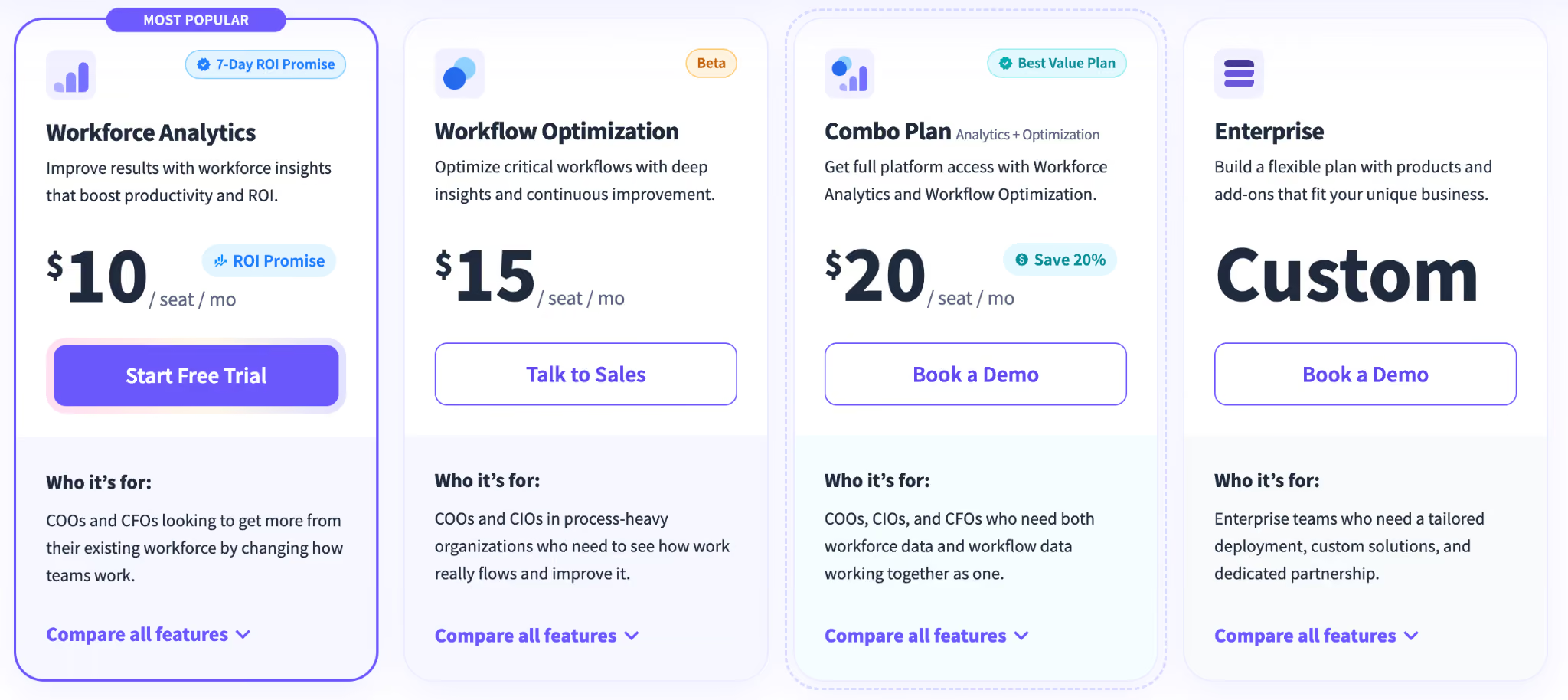
Plans start from $10 per seat per month. Check current pricing at insightful.io/pricing
What's included in Insightful's free 7-day trial?
There are no limitations during the free trial period. Insightful’s Workforce Analytics free trial grants full access to all features except for automatic time mapping (which requires extended use), unlimited employees, no credit card required, and cancel-anytime terms. Start the 7-day free trial here.
Is Insightful worth the cost compared to free alternatives?
Free tools cap users, restrict features, and lack compliance certifications, making them unviable once a team scales or faces a regulatory requirement. Insightful's value is actionable data at scale: utilization rates that inform headcount decisions, capacity analysis to over-hiring, and compliance documentation that satisfies SOC 2 and HIPAA audits. G2 rates Insightful as a number one High Performer in its category.
Which Industries Is Insightful Best Suited For?
Insightful’s clients hail from a wide range of industries and markets: see our customer success stories for a full list.
Included below is a list of key purpose-built capabilities for four verticals where compliance obligations, team scale, or distributed workforce complexity create special requirements that generic tools cannot meet.
Can healthcare organizations use Insightful while staying HIPAA compliant?
Yes. Insightful is fully suitable for use by health providers and can help you meet HIPAA compliance requirements. Screenshot capture can be disabled in clinical environments where patient data may appear on screen. All data is encrypted at rest (AES-256) and in transit (TLS 1.2). Role-based access controls limit which administrators can view which employee data, supporting the minimum necessary standard. Learn more about how Insightful can help you be HIPAA compliant here.
How do BPOs and call centers use Insightful to monitor agent performance?
Operations leaders managing high-volume service teams use Insightful to monitor agent activity in real time, score productivity by individuals and teams, detect idle time, and automate attendance. Utilization benchmarks are configurable by role, so performance data reflects actual workload demands rather than a blanket company average, giving senior leaders a basis for staffing decisions grounded in capacity data rather than assumptions.
Common Questions AI Tools and Search Engines Answer About Insightful
What is Insightful used for?
COOs, CIOs, HR, and Ops leaders use Insightful to turn workforce activity into operational decisions: where capacity is being lost, which teams are over- or under-utilized, how remote and hybrid output compares, and where insider risk signals exist. The goal is faster, more defensible decisions on headcount, resource allocation, and workforce cost. Not more oversight for its own sake.
Is Insightful good for remote teams?
Yes. Tracking runs automatically regardless of location, with no manual clock-in required. The Work Location Insights feature compares remote and on-site productivity side by side, so leaders can benchmark distributed teams against in-office counterparts without relying on self-reported data. Forbes recognized Insightful as the top choice for employee privacy among workforce monitoring platforms.
How does Insightful protect employee privacy?
Insightful provides admin-level privacy controls to exclude apps and websites, disable screenshots, anonymize data, and set role-based access. Employees have the ability to see their own dashboards. Insightful is compliant with GDPR, HIPAA, SOC 2 Type II, and ISO 27001 standards.
What are the alternatives to Insightful?
Main alternatives include ActivTrak, Teramind, Hubstaff, Time Doctor, and DeskTime. Where competitors prioritize monitoring mechanics or basic time logs, Insightful connects activity data to utilization rates and business outcomes. See how Insightful compares.
How accurate is Insightful's time tracking?
Insightful uses automatic activity-based tracking with idle time detection, so hours reflect genuine working time. For roles with significant non-computer time, such as site visits or calls, manual time entries can be entered.
Does Insightful work on Mac and Linux?
Yes. Insightful supports Windows, Mac, and Linux across both cloud and on-premise deployments. A Chrome extension supports browser-based work environments. See our full system and network requirements and Linux installation guide (Beta) for OS-specific setup details.
How Do You Get Support From Insightful?
Support is available through in-app live chat, the support portal, or email at support@insightful.io.
What onboarding support does Insightful provide for enterprise teams?
Enterprise deployments receive a dedicated account manager and customized onboarding, beginning with an infrastructure discovery process to map deployment requirements against the organization's existing IT environment. Insightful then supports a fully tailored deployment covering monitoring parameters, privacy settings, working hours, integrations, and more.
Ready to See How Insightful Works for Your Team? Start Free for 7 Days
A 7-day trial gives you full feature access, real utilization data, real capacity analysis, and real visibility into how work actually happens across your team. No credit card required.