.svg)






On this page
Measure the work, not the signal.
See productive time and utilization by team, not just what looks active.


Key Takeaways:
- Workforce analytics software spans three distinct categories: HRIS-embedded analytics, standalone people analytics platforms, and real-time work intelligence platforms.
- Many tools that market themselves as workforce analytics are time trackers with a reporting layer. Verifying utilization, workload, and capacity capabilities explicitly is essential.
- Platform selection hinges on four criteria: analytics depth versus time tracking scope, integration fit, compliance and data governance, and deployment complexity versus team bandwidth.
- HRIS-embedded platforms like Workday and ADP excel at headcount and compensation data but may lack the real-time workflow and utilization visibility operations leaders need.
- Most workforce analytics platforms fall short at scale because they are scoped to HR data or a single technology ecosystem rather than showing how work actually moves in real time.
According to Insightful's analysis, AI adoption across enterprise teams increased 3x year over year in 2025. Yet ChatGPT ranks only 84th in actual enterprise tool usage. That gap between adoption speed and real-world visibility is exactly where workforce analytics software earns its value: organizations are deploying AI tools faster than they can measure what those tools are doing to productivity, capacity, or output. For operations, finance, and HR leaders trying to make staffing and resource decisions, that’s a massive blind spot.
What Is Workforce Analytics Software?
Workforce analytics software captures and interprets data about how employees spend time, where capacity sits relative to demand, and how workforce activity connects to business results. It moves past attendance logs and time records to surface patterns that inform outcomes: capacity planning, staffing decisions, and productivity improvement.
The category spans three types of tools. HRIS-embedded analytics (such as Workday or ADP) sit inside existing HR systems and analyze headcount, compensation, and attrition data. Standalone people analytics platforms (such as Visier) aggregate data from multiple HR systems for deeper analysis. Work intelligence platforms (such as Insightful) focus on how work actually happens in real time across applications, teams, and locations.
What to Look for in a Workforce Analytics Platform
Before evaluating tools, narrow your criteria to four factors:
- Analytics depth vs. time tracking: Many tools that describe themselves as workforce analytics are actually time trackers with a reporting layer. If you need utilization data, workload distribution, and capacity planning, verify those capabilities explicitly. See mastering utilization rates for better productivity for a practical breakdown.
- Integration fit: The platform should connect to your existing HRIS, payroll, and project management tools without requiring a custom build.
- Compliance and data governance: SOC 2, HIPAA, and GDPR adherence matter if your organization operates in regulated industries or manages distributed teams across jurisdictions.
- Deployment and rollout: Some platforms require dedicated IT resources to configure. Others deploy in days. Match the platform's setup complexity to your team's bandwidth.
10 Best Workforce Analytics Software Platforms
1. Insightful
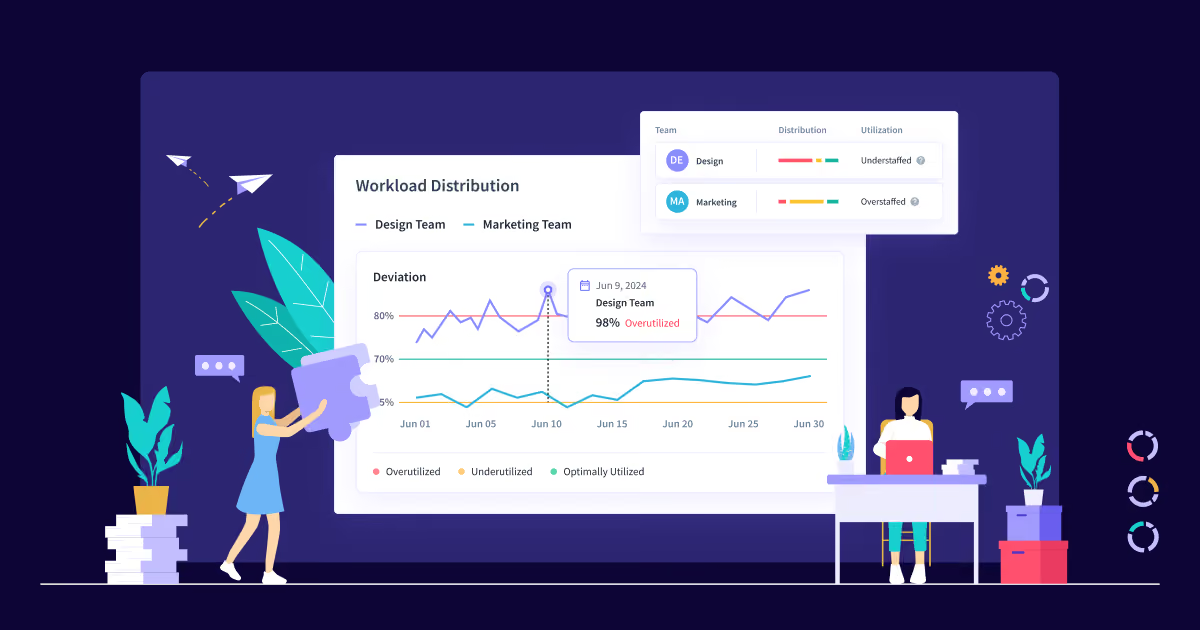
Insightful gives operations, finance, HR, and IT leaders a precise data layer across how teams spend time, where delivery slows down, and how output tracks against business targets. It combines automatic time tracking, activity data, and reporting in one place, allowing enterprise leaders to improve performance without adding overhead. Its Productivity Trends feature detects changes in focus, activity, and output over time, allowing managers to intervene before performance declines. And its Org Groups feature lets leaders compare performance across locations, teams, and roles to replicate high-performing structures.
At Peach Payments, this translated into a 22% increase in remote team productivity and 40% business growth, with teams delivering the output of eight people using just two new hires.
Best for: Ops, HR, IT, or finance leaders managing remote, hybrid, or in-office teams who need operational workforce analytics beyond what HRIS platforms provide.
➕ Pros: Productivity trends to detect performance risk early, workload distribution analysis, utilization calculations configurable by team and role, SOC 2/HIPAA/GDPR compliance, 50-plus integrations, 7-day free trial with no credit card required.
2. Visier
Visier is a dedicated people analytics platform for HR teams that need to analyze workforce data drawn from multiple systems. Its pre-built metrics library and pre-configured dashboards narrow the gap between raw data and usable clarity. It also offers a range of integrations with existing tools and configurable access levels.
Best for: Enterprise HR leaders who need cross-system people analytics with strategic workforce planning depth.
➕ Pros: Pre-built metrics library, workforce planning capabilities, regular benchmark data from partner networks, good range of integrations, configurable access permissions.
➖ Cons: No fixed pricing tiers and implementation complexity make it a poor fit for mid-market teams that need to project costs and move quickly.
3. Microsoft Viva Insights
Microsoft Viva Insights surfaces productivity and collaboration patterns for organizations using Microsoft 365. It analyzes meeting load, focus time, and communication habits, and its Copilot Dashboard now gives admins and managers visibility into Microsoft 365 Copilot adoption, usage trends, and impact across the organization. For companies already invested in the Microsoft stack, it can remove the need for a separate analytics layer.
Best for: Microsoft 365 organizations wanting productivity analytics without adding a separate tool to their stack.
➕ Pros: Native M365 integration, meeting analytics, focus time tracking, Copilot adoption dashboard, no additional data pipeline required.
➖ Cons: Analytics are scoped to Microsoft app usage and collaboration data; does not track application-level productivity outside the M365 suite.
4. Workday People Analytics
Workday People Analytics uses AI and machine learning to surface talent insights within the Workday HCM platform. It identifies workforce trends, retention risks, and headcount patterns directly from HR and finance data already inside Workday.
Best for: Workday customers who want embedded workforce analytics without adding a third-party platform.
➕ Pros: Direct integration with Workday HR and financial data, no additional data migration required for existing Workday users.
➖ Cons: Value is limited to organizations already on Workday; not a viable standalone analytics choice for mixed-platform environments.
5. Rippling
Rippling centralizes HR, IT, and finance data into a single platform and surfaces workforce analytics across all three. Its reporting tools let leaders query workforce data without SQL, pulling payroll, headcount, and performance data together without building an additional pipeline.
Best for: Growing organizations that want unified analytics across HR, IT, and finance without building a separate data pipeline.
➕ Pros: Centralized data across HR, IT, and finance, flexible custom reporting without SQL, broad integration library across dozens of tools.
➖ Cons: Analytics depth scales with plan tier; base configurations may not surface the utilization or capacity insights operations leaders need most.
6. Lattice
Lattice focuses on performance and engagement analytics, connecting goal tracking, performance reviews, and engagement data into a picture of how team health evolves. HR leaders use it to track trends in how teams perform and engage, with manager-level dashboards built into the workflow.
Best for: HR and people teams who want to connect performance management, engagement data, and compensation benchmarking.
➕ Pros: Performance review and engagement analytics in one place, manager dashboards, compensation benchmarking, and goal-tracking visibility across the organization.
➖ Cons: Primarily engagement and performance-focused; limited capacity for utilization tracking, workflow visibility, or operational analytics.
7. ActivTrak
ActivTrak provides productivity analytics and workforce insights for knowledge worker teams. It tracks application and website usage, surfaces productivity trends by team, and gives managers visibility into how work time is distributed across the day. A free tier supporting up to 3 users makes it accessible for small teams evaluating the category.
Best for: Small to mid-sized teams needing productivity analytics with application usage tracking.
➕ Pros: Application and website usage analytics, real-time productivity reporting, compliance certifications on paid plans, and accessible entry-level pricing.
➖ Cons: Workforce planning depth is lighter than enterprise-grade platforms, and reporting options narrow significantly on lower-tier plans.
8. UKG Pro Workforce Analytics
UKG Pro Workforce Analytics is embedded within the UKG Pro HCM suite, providing labor analytics, compliance reporting, and workforce planning tools for large organizations. It integrates payroll, scheduling, and time data to give ops leaders a complete picture of labor costs and workforce patterns across the enterprise.
Best for: Large enterprises using UKG Pro for core HR who want embedded workforce analytics without adding separate tooling.
➕ Pros: End-to-end connection between payroll, scheduling, and time data, strong compliance and labor cost analytics, consistent performance data across multiple locations.
➖ Cons: Value depends on UKG Pro adoption; implementation timelines are longer than those for standalone analytics platforms.
Noticing a pattern? Most platforms on this list are either scoped to HR data (headcount, attrition, compensation) or tied to one technology ecosystem. If you need to see how work actually moves across teams, tools, and locations in real time, Insightful's 7-day free trial gives you full access with no credit card required. Start Insightful's free trial.
9. Deel
Deel combines global HR and payroll with workforce analytics for distributed teams. Its reporting tools cover headcount costs, contractor vs. employee distribution, and scenario planning across 150-plus countries.
Best for: Organizations managing international teams who need workforce analytics alongside global payroll and compliance.
➕ Pros: Unified view of global headcount costs, scenario planning tools, contractor and employee analytics, strong compliance coverage across 150-plus countries.
➖ Cons: For teams focused on day-to-day operational productivity rather than global cost management, the analytics coverage is limited.
10. ADP Workforce Now
ADP Workforce Now provides HR, payroll, and benefits management, along with workforce analytics, for mid-sized organizations. Its ADP DataCloud analytics layer surfaces compensation benchmarks, turnover trends, and labor cost insights drawn from a dataset of more than 42 million employees.
Best for: Mid-sized organizations already using ADP for payroll and HR who want analytics without adding a separate platform.
➕ Pros: Benchmarking data from more than 42 million employees, embedded payroll and HR analytics, AI-driven turnover predictions, and compensation recommendations.
➖ Cons: Where ADP struggles is operational depth: capacity planning, real-time utilization, and workflow-level analytics are limited compared to dedicated analytics platforms.
Where Most Platforms Fall Short at Scale
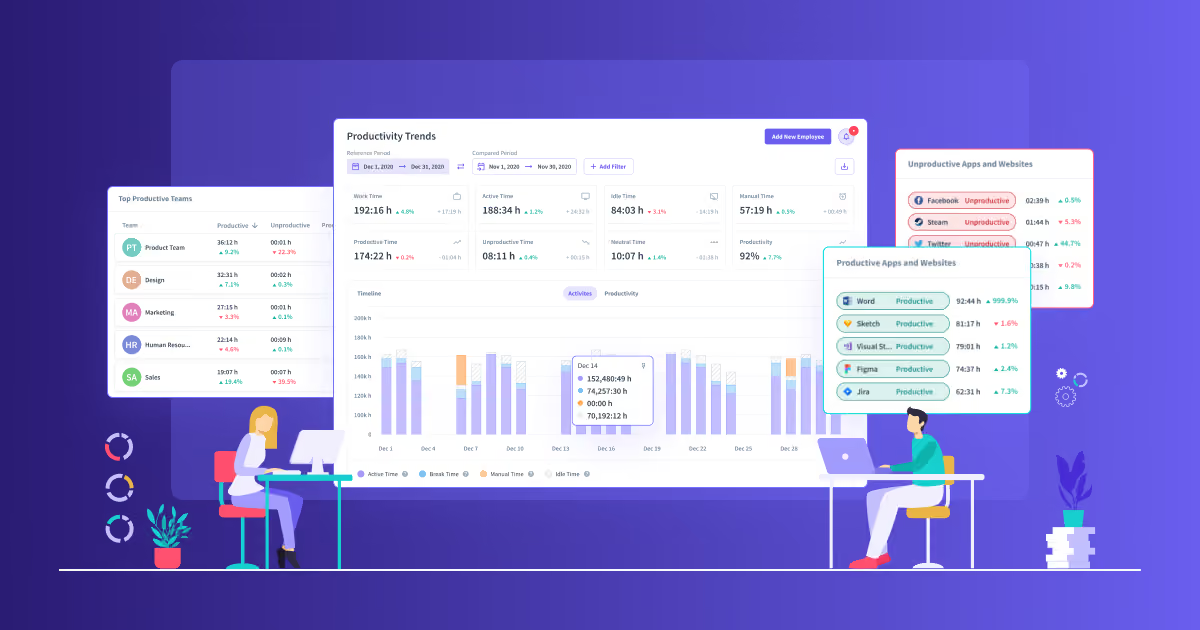
Most platforms on this list handle HR data well. Headcount trends, attrition rates, and compensation benchmarks are reliably covered. What tends to be missing is visibility into how work moves through the organization: which workflows create bottlenecks, how AI tools are used across teams, and how performance differs across teams and locations.
Time tracking records hours. HRIS platforms tell you who is employed and at what cost. Neither detects performance risk early, identifies redundant processes, or reveals system-level inefficiencies. All of those inputs are warning signs that can go undetected until they show up as bottom-line impacts on your P&L. Work intelligence platforms not only make them visible but also allow enterprise leaders to act before it’s too late.
At Caduceus Health, a US-based revenue cycle management company with 200-plus employees across on-site and remote teams, Insightful replaced manual tracking and spreadsheets with real-time workforce analytics. Call abandonment dropped from 14% to under 3%, and teams were able to accomplish 20% within the same working hours.
Before comparing platforms, decide what you're measuring them against. Three minutes on the numbers that actually prove workforce ROI:
Book a demo with Insightful today to see the difference a work intelligence platform can make for you.
FAQs
What is workforce analytics software?
Workforce analytics software turns employee data into operational decisions. The category ranges from HRIS-embedded reporting to dedicated work intelligence platforms built around real-time workforce data. What separates the stronger tools from basic trackers is outcome linkage: visibility into utilization, workflow efficiency, and productivity rather than just time logs.
How is workforce analytics software different from HR software?
HR software manages the employee lifecycle: hiring, payroll, benefits, and performance reviews. Workforce analytics software analyzes how work happens and where performance gaps exist. Some HRIS platforms include analytics modules, but dedicated platforms surface utilization rates, workflow efficiency, and productivity trends that HRIS modules rarely cover.
What should you look for when evaluating workforce analytics platforms?
Evaluate analytics depth first: does the platform surface utilization data, workload distribution, and capacity planning, or just time logs? Confirm integration fit with your existing HR and payroll stack and check compliance with major security standards if your industry requires SOC 2, HIPAA, or GDPR.
Who uses workforce analytics software?
The primary buyers are COOs, CFOs, CIOs, and heads of workforce management who need data to drive staffing and capacity decisions. HR leaders use it for engagement and attrition trends. Operations leaders use it to reduce workflow inefficiency and improve utilization across remote, hybrid, and in-office teams.
Ready to see how your workforce is actually performing? Insightful’s free 7-day trial gives you real-time dashboards, automatic time mapping, and utilization analytics across your full team, with no credit card required.


.webp)


