.svg)


Evaluating Workforce Analytics Platforms: 8 Questions to Ask Your Vendor
Ask these 8 questions before selecting a workforce analytics platform. Cut through vendor noise and choose one that drives real business outcomes.

.avif)



On this page
Measure the work, not the signal.
See productive time and utilization by team, not just what looks active.
Key Takeaways:
- Workforce analytics platforms should connect workforce behavior directly to business outcomes, not just display dashboards of activity and feature counts.
- Vendors emphasizing screenshots or keystroke tracking without discussing business impact are showing activity monitoring, not genuine workforce intelligence.
- Employee trust and transparency are critical evaluation criteria: platforms perceived as surveillance tools produce poor adoption and compromised data quality.
- The right platform should answer whether workforce capacity is being used efficiently and where productivity losses are affecting delivery and margin.
- Evaluating a workforce analytics vendor requires going beyond feature demos to assess whether it improves real operational decisions at the team level.
Today, every COO or CIO is inundated with choices when it comes to workforce analytics vendors. And you’ll find most of them highlighting similar features, such as dashboards, integrations, and visualizations. All those specs can make these platforms look impressive in their demos. But do they actually deliver the expected outcomes?
Workforce analytics platforms are a top focus for high-performing organizations. In fact, 81% of HR leaders say analytics are an important tool for strategic planning. But not all of them manage to achieve better business outcomes.
It can be difficult to go beyond the surface-level features of many platforms to see whether they actually deliver on your targeted operational improvements. Think of it like choosing a sports car based on its dashboard design: it may look pretty, but it doesn’t tell you much about the actual performance of the engine.
So if you really want to go beyond surface details, what should you look for when evaluating a workforce analytics platform? This article gives you a list of 8 questions to ask a potential vendor. The answers can help you cut right through the marketing noise and focus only on what actually drives value.
Why Feature Comparison Is the Wrong Way to Evaluate Workforce Analytics
When it comes to workforce analytics platforms, you can't judge based solely on features. You need insights.
From website usage to productivity monitoring, a workforce analytics platform might claim it tracks just about everything. But all those inputs don't matter if they fail to change how a leader thinks or acts. You have all the data you might ever need. But what about direction? What about using the data to make operational decisions?
So the right way to evaluate a workforce analytics platform isn’t simply to ask "Does it track X?" It's "Does it tell us something we couldn't see before, and allow us to act on it?"
The 8 Questions to Ask Before You Buy
1. Does your reporting connect workforce data to business outcomes, not just activity?
Number of hours worked, app usage, keystrokes: these are typical metrics that many workforce analytics platforms track. But very few can tell whether that activity actually impacts your organization’s bottom line, or how it translates into real business outcomes.
This is how organizations go wrong when evaluating workforce analytics platforms. They mistake activity for impact.
The right thing to do is to make sure the platform connects workforce behavior directly to business outcomes. It has to show the impact of utilization on revenue, or if increasing team size actually results in improved delivery speed.
Red Flag: When vendors emphasize features like screenshots or keystroke tracking without discussing the implications of that data, they’re showing activity, not insight.
2. How does your platform handle employee privacy, and how do you communicate that to employees?
Most organizations use workforce analytics platforms to measure employee performance. But how many consider how employees feel about being measured? Employees rightfully want to know:
- Which of my activities are being tracked?
- Who has access to this?
- How will this information be used?
Without clear answers, even the most advanced systems can be perceived as surveillance rather than tools enabling teams to maximize output and distribute workloads evenly. The result isn't just poor adoption; it's compromised data quality and disengaged teams.
Think of it this way: most people are comfortable working in a glass office, where visibility is mutual and understood. But being observed through a one-way mirror creates uncertainty. And uncertainty undermines trust.
That's why evaluating workforce analytics platforms must consider how transparency is built into the system. That means clear controls for data access, defined visibility tiers, and a well-communicated, employee-facing data policy.
Red flag: When vendors can’t clearly explain what employees can and cannot see, transparency is missing.
3. What does a realistic implementation look like, and how long until we see value?
When it comes to implementation, the real question isn’t how long it will take for the platform to be installed. It's how long it takes before your team begins to see meaningful impact.
That’s why it's extremely important to understand the process of implementation when evaluating workforce analytics platforms. How much IT involvement is required? Does it depend on agent installations? And how long before insights begin influencing decisions, not just appearing in reports?
The most reliable way to answer these questions is through a reference customer with a similar structure. Ask vendors about existing clients with a comparable structure to yours. What did their rollout look like? What difficulties did they have?
Red flag: The vendor is reluctant to walk you through the planned implementation step-by-step or cite comparable clients and case studies.
4. Can you handle different utilization expectations across teams, roles, and locations?
One of the most common mistakes organizational leaders make when evaluating workforce analytics platforms is applying a single definition of productivity across the board.
What "productive" looks like for a BPO team might be very different from that of a knowledge worker. An outside salesperson is likely to have far different utilization patterns than a market researcher.
The best workforce analytics platform is one that adapts to different contexts. You should be able to set different productivity benchmarks for different roles and teams. Find out if there is an option to account for location-based differences, too. See if you can segment insights at the organizational level.
Insightful can help navigate these nuances with features like customizable utilization scores and org groups. The idea is to give you a clear picture of how work actually happens at your organization, not how it is supposed to happen. Learn how you can use utilization rates to maximize team efficiency here.
Red Flag: Vendors applying the same productivity parameters across teams will only give you misleading insights.
5. What integrations does it support, and do they require custom development?
Integration with your tech stack is another benefit most workforce analytics platform vendors claim. Yet integration in theory can be very different from integration in practice.
In reality, no workforce data stays in one place. It's always distributed across payroll systems, HRIS, Project management tools, and communication platforms. And if these systems don't connect seamlessly, your operational insights will never be complete.
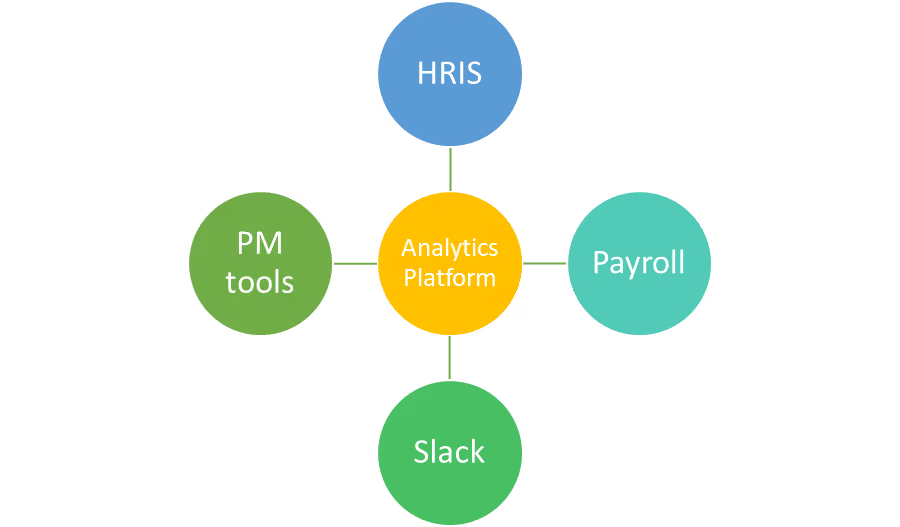
These complexities are why you have to go beyond just the list of integrations and ask:
- Is the integration plug-and-play?
- Would it require dedicated implementation resources?
- Will your IT team need to get involved?
- How much time before data starts flowing seamlessly?
Learn more about how Insightful integrates with your existing technology ecosystem.
Red flag: If you hear "API available upon request," it means the integration feature isn't ready yet.
6. How does it scale across distributed teams and multiple locations?
Most organizations today work with teams that are spread across cities, countries, and time zones. They might have a mix of full-time employees, remote workers, and outsourced talent. Maintaining consistent visibility becomes a challenge. And research backs this up.
In a survey of 750 IT professionals, 77% indicated they lacked full visibility across hybrid environments.
When you evaluate workforce analytics platforms, you have to ensure they offer location-level insights. They should have features to handle multiple time zones. And they should be able to support organizations with outsourced or contractor workforces.
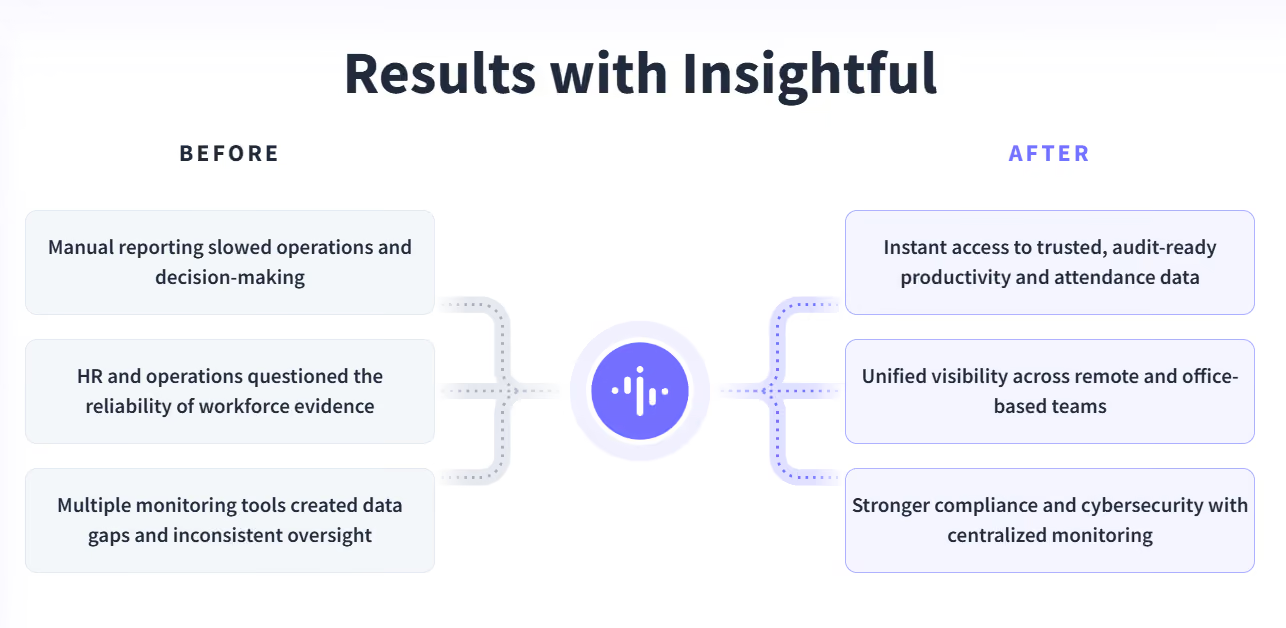
Luckwell Solutions, a California-based healthcare BPO, has delivery teams located in the Philippines. With complete workforce visibility and location-based insights, Insightful made it easier for Luckwell to provide better IT support to its clients. Today, the company is able to better scale its teams while maintaining data accuracy, compliance, and trust across departments.
Red Flag: Platforms that treat all teams as a single unified group may not be effective when it comes to scaling across distributed operations.
7. How accurate is your time and activity data, and how is it calculated?
Most dashboards of workforce analytics platforms look precise, offering a range of metrics and visualizations. They are all built on data. Yet very few organizational leaders attempt to understand how this data is actually calculated.
And without knowing how the data is calculated, you can't be sure of its accuracy. That’s why it’s crucial to dig into the methodology used by the platform for handling data:
That’s why it’s crucial to dig into the methodology used by the platform for handling data:
- Does it distinguish between active and idle time?
- How does it handle employees working across multiple devices?
- Are there options to configure utilization benchmarks?
You will need clear answers for all of these questions. Without them, you can't expect complete accuracy in any of your reports, no matter how detailed they are.
Red Flag: If you are dealing with vendors who don't know how productive time is calculated, you can't trust the data that they promise to deliver.
8. Can you show me a real business outcome and results from a comparable customer?
The first thing that every workforce analytics platform vendor shows you during a demo is the features. Colorful dashboards, integrations, tracking capabilities; the list is always impressive. But without proper business outcomes, there is no proof that these features can deliver value.
What you need is a real example of a customer who is similar to you. You want to know how the platform helped them. Was there a quantifiable increase in their revenue-per-employee rate? Were they able to reduce idle time? Did it help them make efficient staffing decisions in real time?
The goal is not to understand what the platform does. You need proof to help understand what’s been achieved.
Red Flag: Usage metrics, feature adoption, NPS scores: if this is what the conversation is all about, you aren't seeing the real business impact.
Red Flags That Signal a Platform Will Not Deliver
We covered a lot of red flags in the section above. Here’s a short recap of some of the major ones to look out for:
- Too much focus on screenshots, activity tracking, and keystrokes. This means the platform may only operate at the surface level.
- No direct connection between workforce data and business outcomes like efficiency, revenue, and delivery performance. You can't expect the platform to support your business decisions.
- Treating all teams as the same, without accounting for roles, locations, or time zones. Your insights will be inaccurate and hard to act on.
- No proof from organizations similar to yours, with measurable outcomes. There’s little evidence that the platform will work in practice.
Green Flags: Vendor Answers That Signal an Effective Platform
Have you come across any strong vendors while evaluating workforce analytics platforms? These are those that answer clearly and with specificity and proof.
Listing features is to be expected. But good vendors will explain how these features can help you achieve your desired business outcomes. They’ll show you how workforce data connects to business outcomes and how utilization impacts revenue or better performance.
They will answer all your questions about how data is handled or calculated. They will show you exactly how transparency is maintained and how trust is built into their systems.
Most importantly, good vendors provide you with the proof that you need. They give you real examples to show how customers like you have achieved measurable outcomes using their platforms. The focus is not only on adoption metrics or satisfaction scores.
Insightful is a platform that delivers true visibility and real-time activity insights, not just monitoring mechanics. It’s designed to identify system-level inefficiencies, replicate the patterns of top performers across your organization, and turn data into decisions.
Conclusion
Evaluating workforce analytics platforms is by no means an easy task. But all those efforts can go to waste if you can't find yourself a platform that changes the way you make your decisions. Don't just go for something that offers a variety of features. Your focus has to be on real-world impact, outcomes, and transparency.
If you are wondering how to evaluate a workforce analytics platform, use these 8 questions as your guide. Keep an eye out for red flags. And look for platforms like Insightful that lead with transparency and focus on actionable outcomes. Request a free demo with our team, ask the key questions above, and see how we stack up!
FAQs
What is a workforce analytics platform?
A workforce analytics platform is basically a tool that you can use to collect and analyze data about your teams. This will help in understanding productivity, utilization, and performance patterns. Good platforms connect workforce data directly to business outcomes, such as revenue, operational efficiency, and delivery timelines. That makes it easier to take informed data-driven decisions in real time.
What should I prioritize when evaluating workforce analytics vendors?
Your priority should be more on outcomes than features. Look for platforms that connect workforce data to outcomes directly. They should make it easier to scale across teams. Ask for real customer results and make sure they offer transparent data practices. They should be able to explain how data is calculated and how quickly you can expect measurable value.
Is workforce analytics software compliant with privacy regulations?
Most workforce analytics platforms are compliant with GDPR and other data protection laws. But actual compliance might depend on how your platform is configured and communicated internally. Look for tools that come with clear data policies and strong transparency controls. Configurable access levels will ensure both legal compliance and employee trust.

.webp)
.webp)


